Mac & desktop utilities
Tray
A file shelf for your Mac. Drag files between apps, preview with Space, group files into folders and watch Downloads.
- 0community votes
- 2DR by Ahrefs +2 (up) since last check
Ahrefs Domain Rating listed 19 Nov 2026, relisted 18 Nov 2026.
A macOS app that holds file references in a corner of your screen, letting you drag files between applications, preview them, and automatically tidy up old
What it is
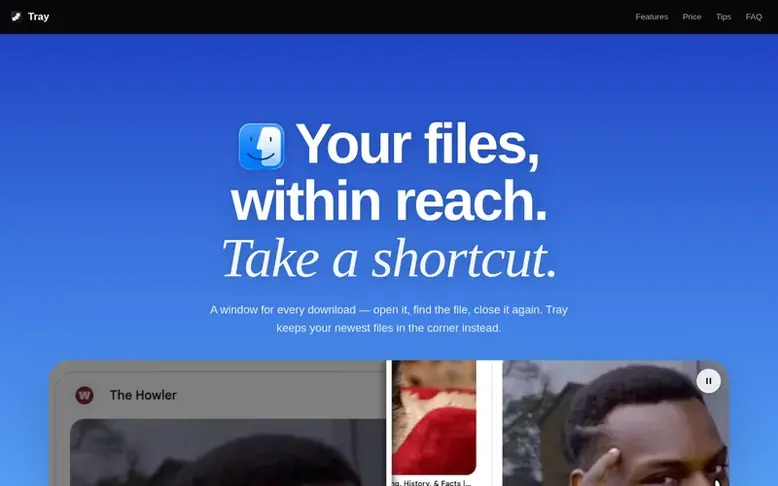
Tray: the homepage
Tray is a macOS file manager that sits in a corner of your screen as a shelf for your files. You can drag files onto it, preview them with Space, and drag them into any window. The app holds references to files rather than copying them, so your files stay in their original locations. Dropped files automatically expire after a day, keeping the shelf tidy, though you can pin important files to keep them permanently. The free version keeps up to three files and watches one folder. Tray Pro, available as a yearly subscription or lifetime purchase, unlocks unlimited file storage, unlimited folder watching, and customization options like adjusting the tray's size, position, and auto-open behavior. The app contains no analytics, telemetry, or account requirements.
Listed capabilities
- Drag files between applications
- Preview files with Space key without opening them
- Automatically monitors Downloads folder
- Files automatically expire after one day
- Group multiple files into one card
- Customizable tray position and appearance
- No dock icon, appears on demand
Pricing
Pricing model: Freemium
Free: up to 3 files, 1 folder. Yearly: $9.99/year (3-day free trial). Lifetime: $79.99 one time.
Follow Tray for an email about each milestone, update and new product they post, in a daily summary.
Tray metrics
| Metric | Value |
|---|---|
| Domain Rating | 2 +2 (up) since last check |
| Trust Flow | 0 no change since last check |
| Citation Flow | 14 no change since last check |
| Referring domains | 2 no change since last check |
| External backlinks | 3 no change since last check |
Ahrefs Domain Rating listed 19 Nov 2026, relisted 18 Nov 2026. Majestic listed 16 Nov 2026, relisted 16 Nov 2026. Link data listed by Majestic. Trust Flow, Citation Flow and Topical Trust Flow are trademarks of Majestic-12 Ltd.
Tray domain listing data
Show the listing data
| Domain age | 26 days |
|---|---|
| Registered | |
| Expires | |
| Registrar | Namecheap Inc. |
| DNSSEC | Not signed |
Tray launch receipt entry
| Measure | At launch, then latest |
|---|---|
| Domain Rating (Ahrefs) | 0 to 2 +2 (up) since launch 16 Nov 2026, then 19 Nov 2026 |
| Trust Flow (Majestic) | 0 first measured 16 Nov 2026 |
| Referring domains (Majestic) | 2 first measured 16 Nov 2026 |
Day 3 since launch. Next receipt: day 30, 16 Dec 2026. We show what changed, not what caused it: many things affect these numbers. Nothing here is estimated.
Before you launch
The playbook on SaaS Directory List lists what to prepare, what to post on launch day and where else to list your product.
Compare and explore
Quick answers
Does Tray move or copy my files?
No, unless you explicitly ask. The tray holds a reference to where files already live, so files remain in their original locations. You can explicitly send files to the Bin or use Put in a Folder to copy or move files into a real folder, but these actions only happen when you choose them.
What happens to files I drop and forget in Tray?
Dropped files automatically expire and are forgotten after one day, while the actual files stay where they are. This makes dropping files a casual act rather than a permanent filing decision. You can change this by setting the lifetime to never if you prefer files to stay permanently.
Does Tray survive a restart?
Yes. Pinned files come back after a relaunch because Tray stores a security-scoped bookmark for every file you give it, allowing them to be restored even under the sandbox security model.
What does Tray collect about me?
Tray collects no account data, analytics, or telemetry. Until you activate a license, the app does not use the network at all. License activation only sends your license key, Mac name, and hardware identifier so the license can be tied to your machine. This is rechecked about once a day.
How many Macs can I use a Tray license on?
A license is activated per Mac and can be moved between your own machines by deactivating it on one Mac before activating on another. If the old Mac is unavailable or you reach the activation limit, you can contact support for help.
Leave a review for Tray
No reviews listed for Tray yet. List the first one.
Listing a review is free. No one pays for reviews. See the listed reviews
List reviews · List updates · Share the list · Your tool? Claim this list entry · Report this list entry
Tray has a free listing. The owner can unlock the full profile with a paid launch for $5:
- Founder story (locked)
- Milestones (locked)
- Demo video (locked)
- Dofollow website link: not on this free listing (its website link is nofollow)
Also on the list
-
DR 26 −1 (down) since last check 2 votes. Log in to move SupaTools up the list
-
 Number 2: MacScapes
Live wallpaper for Mac, drawn as it plays in any of 48 palettes, with widgets, folder icons and sound to match.
DR 13 −1 (down) since last check 1 votes. Log in to move MacScapes up the list -
 Number 3: Taskglass
Shows what's slowing, heating or draining your Mac, and explains it in plain English
Mac & desktop utilitiesSince 2026
DR 5 +1 (up) since last check 0 votes. Log in to move Taskglass up the list -
 Number 4: TocaPad
Mac trackpad controls for volume, brightness and shortcuts
DR 2 +2 (up) since last check 0 votes. Log in to move TocaPad up the list