
Mac & desktop utilities
TocaPad
Mac trackpad controls for volume, brightness and shortcuts
- 0community votes
- 2DR by Ahrefs +2 (up) since last check
Ahrefs Domain Rating listed 19 Nov 2026, relisted 15 Nov 2026.
Free macOS app that adds volume, brightness and shortcut controls to your trackpad edges and corners.
What it is
TocaPad: the homepage
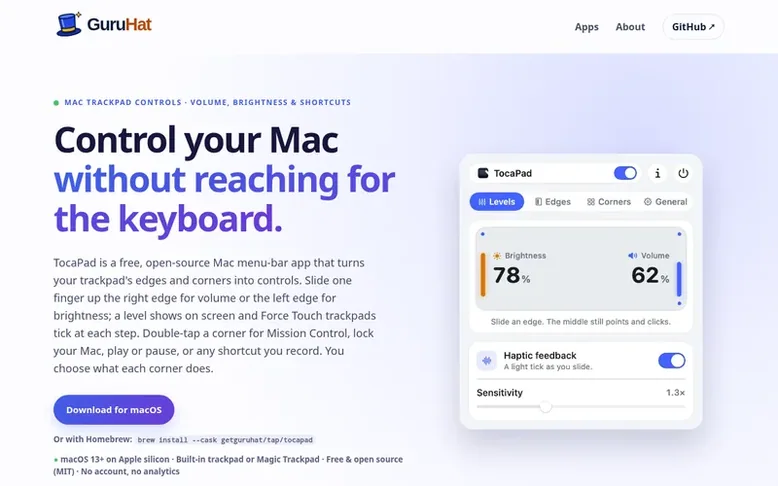
TocaPad is a free, open-source macOS app that transforms your trackpad into a control interface. Slide one finger along the trackpad edges to adjust volume or brightness, with haptic feedback on Force Touch trackpads. Double-tap any corner to trigger actions like opening Mission Control, locking your Mac, playing or pausing media, or executing custom keyboard shortcuts you record.
The app stays out of your way by ignoring palm touches while typing and not interfering with normal two-finger scrolling and gestures. It works with both built-in MacBook trackpads and Magic Trackpads, offering customizable edge placement, sensitivity, and corner assignments. TocaPad requires macOS 13 or later on Apple silicon (M1 and newer) and uses the MIT open-source license.
Listed capabilities
- Slide trackpad edges to adjust volume and brightness with on-screen level indicator
- Double-tap corners to trigger custom actions like Mission Control, lock, play/pause, or keyboard shortcuts
- Haptic feedback with tick marks on Force Touch trackpads
- Cursor freeze to maintain pointer position while adjusting levels
- Fine-step adjustments with Shift-Option modifier for precision
- Customizable edge placement for volume and brightness controls
- Ignores palm touches while typing to prevent accidental activation
- Compatible with built-in MacBook trackpad and Magic Trackpad
- No account or analytics required; operates locally on your Mac
- Available via Homebrew for easy installation and updates
Pricing
Pricing model: Open source
Follow TocaPad for an email about each milestone, update and new product they post, in a daily summary.
TocaPad metrics
| Metric | Value |
|---|---|
| Domain Rating | 2 +2 (up) since last check |
| Trust Flow | 0 no change since last check |
| Citation Flow | 10 no change since last check |
| Referring domains | 1 no change since last check |
| External backlinks | 1 no change since last check |
Ahrefs Domain Rating listed 19 Nov 2026, relisted 15 Nov 2026. Majestic listed 12 Nov 2026, relisted 12 Nov 2026. Link data listed by Majestic. Trust Flow, Citation Flow and Topical Trust Flow are trademarks of Majestic-12 Ltd.
TocaPad domain listing data
Show the listing data
| Domain age | 1 month |
|---|---|
| Registered | |
| Expires | |
| Registrar | Cloudflare, Inc. |
| DNSSEC | Not signed |
TocaPad launch receipt entry
| Measure | At launch, then latest |
|---|---|
| Domain Rating (Ahrefs) | 0 to 2 +2 (up) since launch 12 Nov 2026, then 19 Nov 2026 |
| Trust Flow (Majestic) | 0 first measured 12 Nov 2026 |
| Referring domains (Majestic) | 1 first measured 12 Nov 2026 |
Day 7 since launch. Next receipt: day 30, 12 Dec 2026. We show what changed, not what caused it: many things affect these numbers. Nothing here is estimated.
Before you launch
The playbook on SaaS Directory List lists what to prepare, what to post on launch day and where else to list your product.
Compare and explore
Quick answers
How do I change the volume with my Mac's trackpad?
Install TocaPad, then slide one finger up or down the right edge of the trackpad. The volume follows your finger and a level appears at the top right of the screen. The left edge does the same for brightness.
Can I open Mission Control or run a keyboard shortcut from my trackpad?
Yes. Double-tap a corner and choose what it does: mute, play or pause, skip a track, open Mission Control, show the desktop, lock your Mac, take a screenshot, open an app or press a keyboard shortcut you record. Every corner starts empty, so nothing happens until you set one.
Does TocaPad work with a Magic Trackpad?
Yes. It works with the MacBook's built-in trackpad and with a Magic Trackpad, including one you connect after TocaPad starts.
Does it work on Intel Macs?
Not yet. TocaPad needs macOS 13 or later on Apple silicon (M1 and newer).
Why does macOS block TocaPad the first time I open it?
TocaPad isn't notarized by Apple yet. Open System Settings › Privacy & Security and click Open Anyway once. The source is on GitHub under the MIT license if you want to read it or build it yourself.
Leave a review for TocaPad
No reviews listed for TocaPad yet. List the first one.
Listing a review is free. No one pays for reviews. See the listed reviews
List reviews · List updates · Share the list · Your tool? Claim this list entry · Report this list entry
TocaPad has a free listing. The owner can unlock the full profile with a paid launch for $5:
- Founder story (locked)
- Milestones (locked)
- Demo video (locked)
- Dofollow website link: not on this free listing (its website link is nofollow)
Also on the list
-
DR 26 −1 (down) since last check 2 votes. Log in to move SupaTools up the list
-
 Number 2: MacScapes
Live wallpaper for Mac, drawn as it plays in any of 48 palettes, with widgets, folder icons and sound to match.
DR 13 −1 (down) since last check 1 votes. Log in to move MacScapes up the list -
 Number 3: Tray
A file shelf for your Mac. Drag files between apps, preview with Space, group files into folders and watch Downloads.
DR 2 +2 (up) since last check 0 votes. Log in to move Tray up the list -
 Number 4: Taskglass
Shows what's slowing, heating or draining your Mac, and explains it in plain English
Mac & desktop utilitiesSince 2026
DR 5 +1 (up) since last check 0 votes. Log in to move Taskglass up the list