
Mac & desktop utilities
Taskglass
Shows what's slowing, heating or draining your Mac, and explains it in plain English
- 0community votes
- 5DR by Ahrefs +1 (up) since last check
- 2026founded
Ahrefs Domain Rating listed 19 Nov 2026, relisted 14 Nov 2026.
A native macOS app that identifies which applications are slowing, heating or draining your Mac and explains what they do in plain language, with 30 days of
What it is
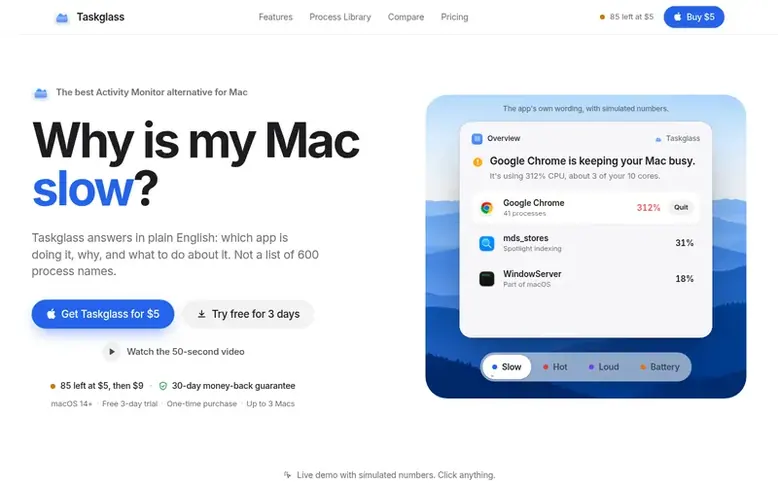
Taskglass: the homepage
Taskglass is a native macOS activity monitor that addresses the problem of understanding why a Mac is slow, hot, loud, or draining battery. Unlike Activity Monitor which shows hundreds of process names, Taskglass groups helper processes under their parent application, explains 214 macOS processes in plain English, and maintains a 30-day timeline of system performance.
The app provides real energy consumption in watts on Apple Silicon, temperature readings from 40+ sensors, per-app network and disk activity, and smart alerts for runaway apps and heat issues. It features a menu bar popover for quick system checks, a command palette for searching processes, and includes a RAM Advisor based on 30 days of memory pressure data.
Taskglass is built as a native Swift and SwiftUI application, requiring just 6 MB of storage and using minimal system resources. It keeps all data on the user's Mac with no account, analytics, or tracking—connecting to the internet only to activate licenses and check for updates.
Listed capabilities
- Groups helper processes under their parent application
- Explains 214 macOS processes in plain English
- 30-day timeline with automatic event markers
- Real energy consumption in watts on Apple Silicon
- Smart alerts for runaway apps and heat
- Temperature readings from 40+ sensors
- Menu bar popover for quick access
- Command palette search with ⌘K
- Per-app network and disk activity
- RAM Advisor based on memory pressure history
Pricing
Pricing model: Paid
One-time purchase: first 100 licenses $5 USD, next 150 licenses $9 USD, then $14 USD. One license covers up to 3 Macs and includes all 1.x updates. 3-day free trial available.
Follow Taskglass for an email about each milestone, update and new product they post, in a daily summary.
Taskglass metrics
| Metric | Value |
|---|---|
| Domain Rating | 5 +1 (up) since last check |
| Trust Flow | 3 no change since last check |
| Citation Flow | 19 no change since last check |
| Referring domains | 9 no change since last check |
| External backlinks | 76 no change since last check |
Ahrefs Domain Rating listed 19 Nov 2026, relisted 14 Nov 2026. Listed under topic: Society/People (3). Majestic listed 13 Nov 2026, relisted 13 Nov 2026. Link data listed by Majestic. Trust Flow, Citation Flow and Topical Trust Flow are trademarks of Majestic-12 Ltd.
Taskglass domain listing data
Show the listing data
| Domain age | 15 days |
|---|---|
| Registered | |
| Expires | |
| Registrar | Spaceship, Inc. |
| DNSSEC | Not signed |
Taskglass launch receipt entry
| Measure | At launch, then latest |
|---|---|
| Domain Rating (Ahrefs) | 4 to 5 +1 (up) since launch 13 Nov 2026, then 19 Nov 2026 |
| Trust Flow (Majestic) | 3 first measured 13 Nov 2026 |
| Referring domains (Majestic) | 9 first measured 13 Nov 2026 |
Day 6 since launch. Next receipt: day 30, 13 Dec 2026. We show what changed, not what caused it: many things affect these numbers. Nothing here is estimated.
Before you launch
The playbook on SaaS Directory List lists what to prepare, what to post on launch day and where else to list your product.
Compare and explore
Quick answers
What is Taskglass?
Taskglass is a native macOS app that shows what's slowing, heating or draining your Mac and explains it in plain English. It's an Activity Monitor alternative that groups helper processes under their app, explains 214 macOS processes, and keeps a 30-day timeline.
How much does Taskglass cost?
Taskglass is a one-time purchase. During launch the first 100 licenses cost $5, the next 150 cost $9, and after that it's $14. One license covers up to 3 Macs and includes all 1.x updates.
Is there a free trial?
Yes, Taskglass offers a 3-day free trial with everything unlocked, no account or card required. After the trial ends you need a license key to continue using it.
Which Macs does Taskglass support?
Taskglass runs on macOS 14 Sonoma or later on both Apple Silicon and Intel Macs. It's a native Swift and SwiftUI app with a 6 MB download and no Electron.
Does Taskglass collect my data?
No. There's no account and no analytics in the app, and everything stays on your Mac. Taskglass only connects to the internet to activate your license and check for updates.
Leave a review for Taskglass
No reviews listed for Taskglass yet. List the first one.
Listing a review is free. No one pays for reviews. See the listed reviews
List reviews · List updates · Share the list · Your tool? Claim this list entry · Report this list entry
Taskglass has a free listing. The owner can unlock the full profile with a paid launch for $5:
- Founder story (locked)
- Milestones (locked)
- Demo video (locked)
- Dofollow website link: not on this free listing (its website link is nofollow)
Also on the list
-
DR 26 −1 (down) since last check 2 votes. Log in to move SupaTools up the list
-
 Number 2: MacScapes
Live wallpaper for Mac, drawn as it plays in any of 48 palettes, with widgets, folder icons and sound to match.
DR 13 −1 (down) since last check 1 votes. Log in to move MacScapes up the list -
 Number 3: Tray
A file shelf for your Mac. Drag files between apps, preview with Space, group files into folders and watch Downloads.
DR 2 +2 (up) since last check 0 votes. Log in to move Tray up the list -
 Number 4: TocaPad
Mac trackpad controls for volume, brightness and shortcuts
DR 2 +2 (up) since last check 0 votes. Log in to move TocaPad up the list