
Mac & desktop utilities
Lisorto
Your Mac, sorted. Any file, found.
- 0community votes
- 32DR by Ahrefs +4 (up) since last check
Ahrefs Domain Rating listed 6 Nov 2026, relisted 4 Nov 2026.
AI file organizer for Mac that sorts files into folders, renames scans and screenshots, and searches by content. Every move is shown first and can be undone.
What it is
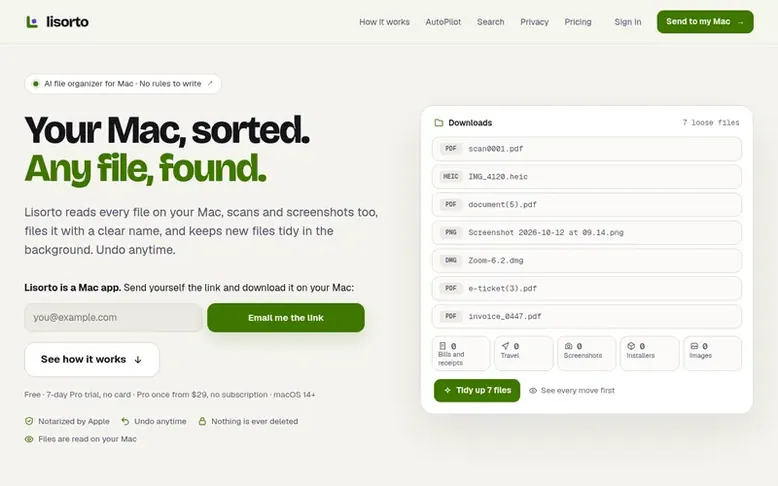
Lisorto: the homepage
Lisorto is an AI file organizer for Mac that automatically sorts files into organized folders called Spaces, renames scans and screenshots based on their content, and finds any file by searching for words inside it. The app reads files locally on your Mac without uploading them to the cloud, shows you every proposed move before making it, and allows you to undo any action. AutoPilot keeps new files automatically organized in the background, and the search feature can find files across multiple folders including scans and photos that traditional search cannot read.
The app includes a free version with basic organization and search, and paid Pro and Business tiers that unlock unlimited file organization, AutoPilot automation, AI-powered naming, broader search capabilities, and financial tracking features. All moves are recorded in History so nothing is ever permanently lost.
Listed capabilities
- Tidy up: manually organize files into folders with preview before moving
- AutoPilot: automatically organize new files as they arrive
- Clear names: rename scans and screenshots based on their content
- Search by content: find files by words inside them, including scans
- History and Undo: revert any move, one file or entire batch
- Duplicates detection: move duplicate files to their own folder
- Free up space: identify and list installers, copies, and unused large files
- AI sorting with user consent: optional cloud AI or on-device AI for uncertain files
- Question answering: ask questions about file contents like expiration dates
- Multiple folder support: organize Downloads, Desktop, Documents, or any custom folder
Pricing
Pricing model: Freemium
Lisorto Free: $0 (100 files per month). Lisorto Pro: $4.99 per month, $29 per year, or $29 once (lifetime). Lisorto Business: $9 per month or $79 per year.
Follow Lisorto for an email about each milestone, update and new product they post, in a daily summary.
Lisorto metrics
| Metric | Value |
|---|---|
| Domain Rating | 32 +4 (up) since last check |
| Trust Flow | 4 no change since last check |
| Citation Flow | 24 no change since last check |
| Referring domains | 13 no change since last check |
| External backlinks | 172 no change since last check |
Ahrefs Domain Rating listed 6 Nov 2026, relisted 4 Nov 2026. Listed under topic: Society/Activism (4). Majestic listed 25 Oct 2026, relisted 25 Oct 2026. Link data listed by Majestic. Trust Flow, Citation Flow and Topical Trust Flow are trademarks of Majestic-12 Ltd.
Lisorto domain listing data
Show the listing data
| Domain age | 1 month |
|---|---|
| Registered | |
| Expires | |
| Registrar | Namecheap Inc. |
| DNSSEC | Not signed |
Lisorto launch receipt entry
| Measure | At launch, then latest |
|---|---|
| Domain Rating (Ahrefs) | 29 to 32 +3 (up) since launch 25 Oct 2026, then 6 Nov 2026 |
| Trust Flow (Majestic) | 4 first measured 25 Oct 2026 |
| Referring domains (Majestic) | 13 first measured 25 Oct 2026 |
Day 11 since launch. Next receipt: day 30, 24 Nov 2026. We show what changed, not what caused it: many things affect these numbers. Nothing here is estimated.
Before you launch
The playbook on SaaS Directory List lists what to prepare, what to post on launch day and where else to list your product.
Compare and explore
Quick answers
Does Lisorto ever delete my files?
No. Lisorto only moves and renames files after you approve each move. Duplicate copies are moved to their own Duplicates folder, and every move can be undone individually or as a whole batch.
Do my files leave my Mac?
No. Lisorto reads files locally on your Mac and keeps the search index there. Cloud AI is optional and turned off by default; when enabled, it only sends a short text excerpt of documents it cannot classify, never the full file.
What does AutoPilot do?
AutoPilot automatically sorts new files the moment they land in a chosen folder, names new screenshots and scans based on their content, and undoes any move. Files the AI is uncertain about wait for manual approval, nothing is deleted, and all moves are recorded in History.
How is Lisorto different from Hazel, Sparkle, or Sortio?
Lisorto reads each file on your Mac, proposes where it should go and what to name it, and moves nothing until you approve. It has one Undo for the whole batch and can find files by any word inside them, including scans and screenshots.
What happens after the 7-day trial?
Nothing is charged because no card was required. The app switches to Lisorto Free: 100 files per month by hand, search of organized files, duplicates, History and Undo. AutoPilot and unlimited features require Lisorto Pro.
Leave a review for Lisorto
No reviews listed for Lisorto yet. List the first one.
Listing a review is free. No one pays for reviews. See the listed reviews
List reviews · List updates · Share the list · Your tool? Claim this list entry · Report this list entry
Lisorto has a free listing. The owner can unlock the full profile with a paid launch for $5:
- Founder story (locked)
- Milestones (locked)
- Demo video (locked)
- Dofollow website link (locked)
Also on the list
-
 Number 1: MacScapes
Live wallpaper for Mac, drawn as it plays in any of 48 palettes, with widgets, folder icons and sound to match.
DR 11 +1 (up) since last check 1 votes. Log in to move MacScapes up the list -
 Number 2: Wallspace
Live wallpaper app for Mac with 4K cinematic wallpapers, lock screen support, and multi-monitor capabilities without draining battery or requiring login
DR 31 +1 (up) since last check 0 votes. Log in to move Wallspace up the list -
 Number 3: Tidix
Native macOS system monitor that shows every core, GPU, Neural Engine, disk, network interface, and process power draw
Mac & desktop utilitiesMexico
DR 3 +1 (up) since last check 0 votes. Log in to move Tidix up the list -
DR 0 no change since last check 0 votes. Log in to move Mergd up the list
