
Mac & desktop utilities
Hotspot Meter
Track Wi-Fi and hotspot data usage in real time on Mac
- 0community votes
- 19DR by Ahrefs no change since last check
Ahrefs Domain Rating listed 6 Nov 2026, relisted 28 Oct 2026.
A free macOS menu-bar app that displays live speeds, network totals, and configurable usage alerts with multiple themes.
What it is
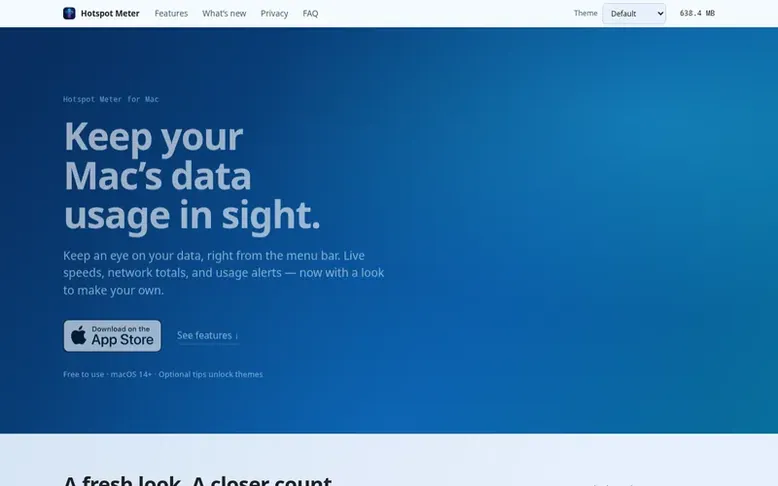
Hotspot Meter: the homepage
Hotspot Meter is a free macOS menu-bar app that tracks Wi-Fi and hotspot data usage in real time. It displays live download and upload rates, session totals, and running totals for each network, all accessible with one click from the menu bar.
The app tracks usage across metered connections including phone hotspots, hotel and café Wi-Fi, travel routers, and tethered connections. It includes per-network history with cumulative usage and first/last-seen dates, configurable usage alerts from 100 MB to 10 GB, and auto-tracking options.
All tracking features remain free. Optional tips unlock three additional themes beyond the default, and the app launches automatically at login. Everything runs and is stored on your Mac with no data collection or transmission.
Listed capabilities
- Live speeds with real-time download and upload rates in menu bar
- Session and network totals tracking
- Per-network history with cumulative usage and first/last-seen dates
- Usage alerts from 100 MB to 10 GB
- Auto-tracking for hotspots and new networks
- Flexible menu bar display options
- Launch automatically at login
- Multiple themes including Terminal, Dial, and Aurora
- All data stored locally with no transmission
- Reset usage counters and history management
Pricing
Pricing model: Freemium
Free to use. Optional tips unlock three themes (Terminal, Dial, Aurora); Default theme and all tracking features included free.
Follow Hotspot Meter for an email about each milestone, update and new product they post, in a daily summary.
Hotspot Meter metrics
| Metric | Value |
|---|---|
| Domain Rating | 19 no change since last check |
| Trust Flow | 5 no change since last check |
| Citation Flow | 18 no change since last check |
| Referring domains | 40 no change since last check |
| External backlinks | 474 no change since last check |
Ahrefs Domain Rating listed 6 Nov 2026, relisted 28 Oct 2026. Listed under topic: Computers/Software/Graphics (4). Majestic listed 27 Oct 2026, relisted 27 Oct 2026. Link data listed by Majestic. Trust Flow, Citation Flow and Topical Trust Flow are trademarks of Majestic-12 Ltd.
Hotspot Meter domain listing data
Show the listing data
.sk is run by a registry that does not publish RDAP data: there is no public record for us to show.
Hotspot Meter launch receipt entry
| Measure | At launch, then latest |
|---|---|
| Domain Rating (Ahrefs) | 19 to 19 no change since launch 28 Oct 2026, then 5 Nov 2026 |
| Trust Flow (Majestic) | 5 first measured 27 Oct 2026 |
| Referring domains (Majestic) | 40 first measured 27 Oct 2026 |
Day 9 since launch. Next receipt: day 30, 26 Nov 2026. We show what changed, not what caused it: many things affect these numbers. Nothing here is estimated.
Before you launch
The playbook on SaaS Directory List lists what to prepare, what to post on launch day and where else to list your product.
Compare and explore
Quick answers
What is Hotspot Meter?
Hotspot Meter is a free macOS menu-bar app that tracks Wi-Fi and hotspot data usage in real time.
How much does Hotspot Meter cost?
All tracking features are free. An optional tip unlocks Terminal, Dial, and Aurora themes; the Default theme is included.
Which macOS versions are supported?
Hotspot Meter requires macOS 14 Sonoma and later.
Does Hotspot Meter collect or upload my data?
No. Everything runs and is stored on-device; nothing is collected, stored remotely, or transmitted.
How do usage alerts work?
Set a session limit from 100 MB to 10 GB, or a separate network cap in GB. A native macOS notification appears when the chosen limit is crossed.
Leave a review for Hotspot Meter
No reviews listed for Hotspot Meter yet. List the first one.
Listing a review is free. No one pays for reviews. See the listed reviews
List reviews · List updates · Share the list · Your tool? Claim this list entry · Report this list entry
Hotspot Meter has a free listing. The owner can unlock the full profile with a paid launch for $5:
- Founder story (locked)
- Milestones (locked)
- Demo video (locked)
- Dofollow website link (locked)
Also on the list
-
 Number 1: MacScapes
Live wallpaper for Mac, drawn as it plays in any of 48 palettes, with widgets, folder icons and sound to match.
DR 11 +1 (up) since last check 1 votes. Log in to move MacScapes up the list -
 Number 2: Wallspace
Live wallpaper app for Mac with 4K cinematic wallpapers, lock screen support, and multi-monitor capabilities without draining battery or requiring login
DR 31 +1 (up) since last check 0 votes. Log in to move Wallspace up the list -
 Number 3: Tidix
Native macOS system monitor that shows every core, GPU, Neural Engine, disk, network interface, and process power draw
Mac & desktop utilitiesMexico
DR 3 +1 (up) since last check 0 votes. Log in to move Tidix up the list -
DR 0 no change since last check 0 votes. Log in to move Mergd up the list
