
Mac & desktop utilities
DockFlow
Switch between macOS Dock presets instantly with one click
- 0community votes
- 16DR by Ahrefs +1 (up) since last check
Ahrefs Domain Rating listed 6 Nov 2026, relisted 3 Nov 2026.
A macOS app that lets you save and switch between Dock presets instantly. Works with the native Dock without requiring permissions, includes one year of updates
What it is
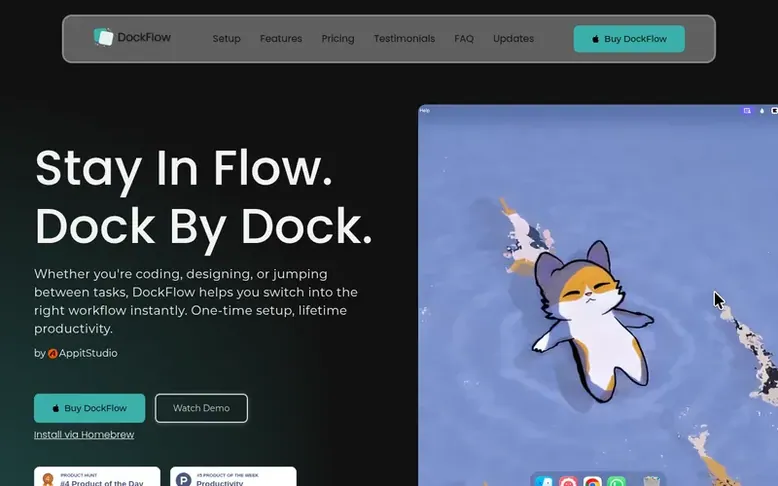
DockFlow: the homepage
DockFlow is a macOS productivity app that lets you save and switch between different Dock presets with a single click. Instead of manually rearranging your Dock or launching different apps for each task, you can create presets for different workflows—like coding, design, or writing—and activate them instantly.
The app works with your native macOS Dock rather than replacing it, so it doesn't require special permissions out of the box and has zero impact on system performance. You can create presets by capturing your current Dock setup or building one manually by adding apps, folders, files, website links, and spacers.
DockFlow supports keyboard shortcuts, key sequences, and multi-press hotkeys for switching presets. It also integrates with Apple Shortcuts and macOS Focus modes, so your Dock can change automatically when you activate a Focus mode. Additional features include the ability to control how apps launch after a switch, lock your Dock to a specific display, and export or share presets.
Listed capabilities
- Save and switch Dock presets with one click
- Keyboard shortcuts and hotkeys for preset switching
- Add apps, folders, files, web links, and spacers to presets
- Integration with Apple Shortcuts
- Integration with macOS Focus modes
- Control app launch actions and browser profile switching
- Lock Dock to specific display
- Export and import presets as JSON backup
- Share presets with DockShare
- Supports macOS 13.5 or later
Pricing
Pricing model: Paid
One Year License: €14.99 per year for 1 Mac; Lifetime Access: €21.17 per Mac (discounted from €35.29) for 1, 2, or 3 Macs; Forever Edition: €59.99 (discounted from €99.99) for up to 5 Macs with all future updates; optional renewal at €9.99 per year per Mac.
Follow DockFlow for an email about each milestone, update and new product they post, in a daily summary.
DockFlow metrics
| Metric | Value |
|---|---|
| Domain Rating | 16 +1 (up) since last check |
| Trust Flow | 6 no change since last check |
| Citation Flow | 24 no change since last check |
| Referring domains | 135 no change since last check |
| External backlinks | 3,117 no change since last check |
Ahrefs Domain Rating listed 6 Nov 2026, relisted 3 Nov 2026. Listed under topic: Computers/Software/Operating Systems (6). Majestic listed 25 Oct 2026, relisted 25 Oct 2026. Link data listed by Majestic. Trust Flow, Citation Flow and Topical Trust Flow are trademarks of Majestic-12 Ltd.
DockFlow domain listing data
Show the listing data
| Domain age | 5 months |
|---|---|
| Registered | |
| Expires | |
| Registrar | GoDaddy.com, LLC |
| DNSSEC | Not signed |
DockFlow launch receipt entry
| Measure | At launch, then latest |
|---|---|
| Domain Rating (Ahrefs) | 14 to 16 +2 (up) since launch 25 Oct 2026, then 6 Nov 2026 |
| Trust Flow (Majestic) | 6 first measured 25 Oct 2026 |
| Referring domains (Majestic) | 135 first measured 25 Oct 2026 |
Day 11 since launch. Next receipt: day 30, 24 Nov 2026. We show what changed, not what caused it: many things affect these numbers. Nothing here is estimated.
Before you launch
The playbook on SaaS Directory List lists what to prepare, what to post on launch day and where else to list your product.
Compare and explore
Quick answers
How do I set up my Dock layouts with DockFlow?
Click "Add Preset," then either capture your current Dock with "Set from Current Dock" or build one yourself by adding apps. You can also add folders, files, web links, and spacers. Name it and you're done.
Can I assign keyboard shortcuts to switch Dock presets?
Yes, DockFlow supports single key shortcuts, key sequences, and multi-press hotkeys. You can also automate switching with Apple Shortcuts or link presets to macOS Focus modes so your Dock changes automatically when your Focus mode does.
Which macOS versions does DockFlow support?
DockFlow requires macOS 13.5 or later.
Does DockFlow require any permissions?
DockFlow's core preset features do not require special permissions. The optional Lock Dock feature requires Accessibility permission to keep the native Dock fixed to your chosen display.
Can I back up or share my DockFlow presets?
Yes, you can export your presets and Dock layouts as a JSON backup and import them later without removing your existing presets. You can also share individual presets through DockShare.
Leave a review for DockFlow
No reviews listed for DockFlow yet. List the first one.
Listing a review is free. No one pays for reviews. See the listed reviews
List reviews · List updates · Share the list · Your tool? Claim this list entry · Report this list entry
DockFlow has a free listing. The owner can unlock the full profile with a paid launch for $5:
- Founder story (locked)
- Milestones (locked)
- Demo video (locked)
- Dofollow website link (locked)
Also on the list
-
 Number 1: MacScapes
Live wallpaper for Mac, drawn as it plays in any of 48 palettes, with widgets, folder icons and sound to match.
DR 11 +1 (up) since last check 1 votes. Log in to move MacScapes up the list -
 Number 2: Wallspace
Live wallpaper app for Mac with 4K cinematic wallpapers, lock screen support, and multi-monitor capabilities without draining battery or requiring login
DR 31 +1 (up) since last check 0 votes. Log in to move Wallspace up the list -
 Number 3: Tidix
Native macOS system monitor that shows every core, GPU, Neural Engine, disk, network interface, and process power draw
Mac & desktop utilitiesMexico
DR 3 +1 (up) since last check 0 votes. Log in to move Tidix up the list -
DR 0 no change since last check 0 votes. Log in to move Mergd up the list
