
Developer Tools
VsTerm
Native Rust SSH workstation with terminal, files, and ops panels in one session
- 0community votes
- 0DR by Ahrefs no change since last check
Ahrefs Domain Rating listed 20 Nov 2026, relisted 18 Nov 2026.
A cross-platform SSH terminal workbench built in Rust that combines terminal, SFTP file management, and operations panels in a single session, with built-in
What it is
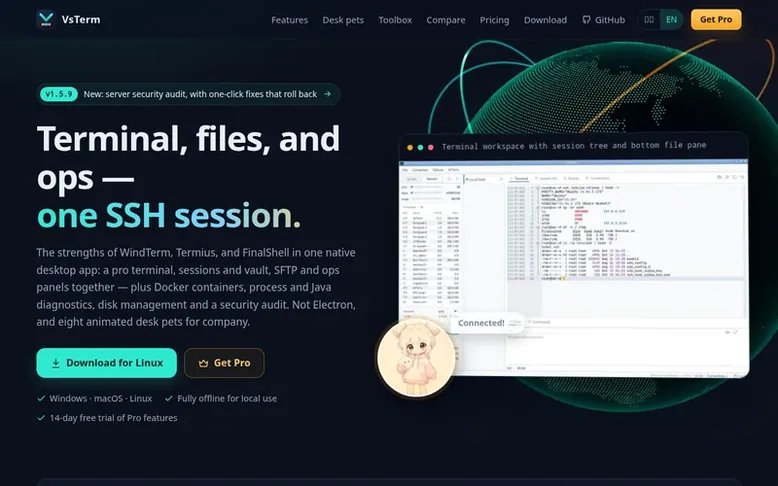
VsTerm: the homepage
VsTerm is a native Rust SSH workstation for Windows, macOS, and Linux that integrates terminal, SFTP file management, and operations panels in a single authenticated session. The platform features built-in Docker and Podman container management, process and Java diagnostics, disk analysis and storage management, and server security audits with one-click hardening. It supports network tools including route topology visualization, path tracing with geographic and ASN information, and IP quality monitoring. All operations are performed through native SSH commands without requiring server-side agents. The application uses GPU-accelerated rendering (DirectX 12 on Windows, Metal on macOS, Vulkan on Linux) with software rendering fallback for virtual machines. Standard version is free with 100,000 lines of terminal history, local encryption for credentials, and four desktop pets. Pro version adds 500,000 lines of history, cloud synchronization with client-side encryption, advanced storage management, Java diagnostics, security hardening, and eight interactive desktop pets.
Listed capabilities
- Terminal with 100k-500k line history
- Integrated SFTP file panel with progress queue
- ZMODEM (rz/sz) file transfer support
- Docker and Podman container management with logs and auto-rollback upgrades
- Process and Java diagnostics with thread analysis and heap dumps
- Disk analysis and storage management with NAS/iSCSI mounting
- Server security audit and one-click hardening with auto-rollback
- Bidirectional cloud sync with client-side encryption
- Network tools with route topology and path tracing with geolocation
- Eight interactive desktop pets
Pricing
Pricing model: Freemium
Standard: free; Pro annual: $9.90/year; Pro lifetime: $29.90 one-time
Follow VsTerm for an email about each milestone, update and new product they post, in a daily summary.
VsTerm metrics
| Metric | Value |
|---|---|
| Domain Rating | 0 no change since last check |
| Trust Flow | 0 no change since last check |
| Citation Flow | 13 no change since last check |
| Referring domains | 2 no change since last check |
| External backlinks | 3 no change since last check |
Ahrefs Domain Rating listed 20 Nov 2026, relisted 18 Nov 2026. Majestic listed 18 Nov 2026, relisted 18 Nov 2026. Link data listed by Majestic. Trust Flow, Citation Flow and Topical Trust Flow are trademarks of Majestic-12 Ltd.
VsTerm domain listing data
Show the listing data
| Domain age | 3 months |
|---|---|
| Registered | |
| Expires | |
| Registrar | Cloudflare, Inc. |
| DNSSEC | Signed |
VsTerm launch receipt entry
| Measure | At launch, then latest |
|---|---|
| Domain Rating (Ahrefs) | 0 to 0 no change since launch 18 Nov 2026, then 20 Nov 2026 |
| Trust Flow (Majestic) | 0 first measured 18 Nov 2026 |
| Referring domains (Majestic) | 2 first measured 18 Nov 2026 |
Day 2 since launch. Next receipt: day 30, 18 Dec 2026. We show what changed, not what caused it: many things affect these numbers. Nothing here is estimated.
Before you launch
The playbook on SaaS Directory List lists what to prepare, what to post on launch day and where else to list your product.
Compare and explore
Quick answers
Do I need to register an account to use VsTerm?
No. Local SSH, SFTP, ops panels and desktop pets can be used completely offline. An account is only needed for Pro features and cloud synchronization.
What does the 14-day free trial include?
Each new installation can use all local Pro features free for 14 days: 500k terminal history, network storage and iSCSI mounting guides, Java diagnostics, one-click security hardening, and four additional desktop pets (Yunyuan, Golden Buddha, Supreme Old Lord, Monkey). Cloud sync requires a paid Pro subscription.
Does cloud sync overwrite configurations if both computers are modified?
No. The sync feature compares changes on both sides since the last sync: it directly syncs if only one side changed, merges item-by-item if both changed, keeps the local value on conflicts, and stores the cloud version in a local backup.
Do mounted storage and security hardening persist after the trial expires?
Yes. Mounted storage and hardening are normal server configurations (fstab, sshd configuration, etc.) that continue to work normally after trial expiration. Viewing, unmounting, disconnecting and reverting are always free.
Do ops tools require installing an agent on the server?
No. Container, process, disk and security checking all call the server's native commands through the current SSH session, leaving no background processes. Operations requiring root can accept sudo password input in the app, stored only in memory.
Leave a review for VsTerm
No reviews listed for VsTerm yet. List the first one.
Listing a review is free. No one pays for reviews. See the listed reviews
List reviews · List updates · Share the list · Your tool? Claim this list entry · Report this list entry
VsTerm has a free listing. The owner can unlock the full profile with a paid launch for $5:
- Founder story (locked)
- Milestones (locked)
- Demo video (locked)
- Dofollow website link: not on this free listing (its website link is nofollow)
Also on the list
-
DR 76 no change since last check 8 votes. Log in to move Remotion up the list
-
 Number 2: IT Admin Utils
Browser-based diagnostic tools for understanding systemd, Docker, DNS, cURL, and SSH errors
Developer ToolsNew ZealandVerified
DR 2 no change since last check 3 votes. Log in to move IT Admin Utils up the list -
DR 39 +1 (up) since last check 1 votes. Log in to move NerimaSoft up the list
-
 Number 4: Laravel Suspicious Login
Detect and respond to suspicious logins in Laravel applications
Developer ToolsBelgiumSince 2004
DR 74 no change since last check 0 votes. Log in to move Laravel Suspicious Login up the list