
Developer Tools
OP Auto Clicker
Free, portable auto clicker for Windows PC with hotkey control and adjustable click intervals
- 0community votes
- 24DR by Ahrefs +1 (up) since last check
- 2021founded
Ahrefs Domain Rating listed 20 Nov 2026, relisted 17 Nov 2026.
A free, portable Windows utility that automates mouse clicking with customizable speed, button selection, and hotkey control. No installation required.
What it is
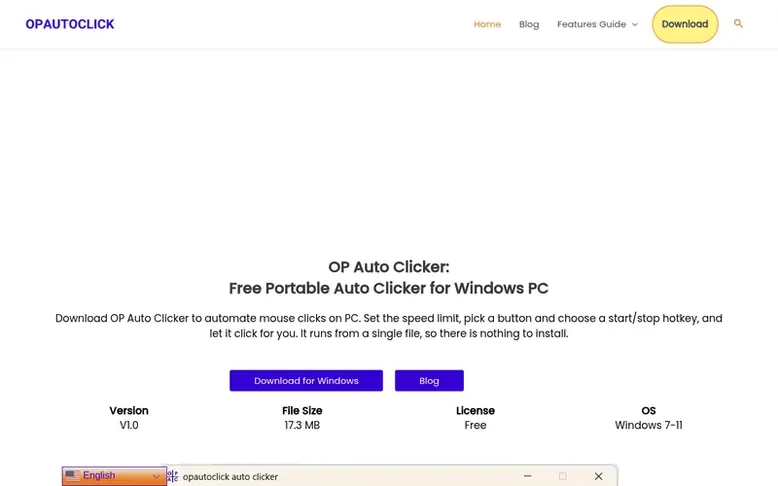
OP Auto Clicker: the homepage
OP Auto Clicker is a lightweight, portable Windows tool that automates repetitive mouse clicking tasks. Users set the click speed, choose a mouse button, assign a hotkey for start/stop control, and let the tool handle the clicking. It requires no installation and runs from a single file, making it easy to configure and use on older PCs, budget laptops, and everyday work machines.
The tool supports left, right, and middle mouse button clicks with options for single or double clicks. It offers adjustable click intervals for precise control, fixed or current cursor positioning, customizable hotkey settings, and record and playback functionality. The program is designed to be light on system resources and maintains a simple, single-screen interface with no complex setup wizards.
OP Auto Clicker is suitable for various use cases including idle and clicker games, software and website testing, data entry and office tasks, accessibility support for people who find repeated clicking difficult, page refreshing with timed clicks, and design and creative work. The tool operates with no internet connection and stores all data locally on the user's computer.
Listed capabilities
- Adjustable click intervals for precise timing control
- Support for left, right, and middle mouse buttons with single and double click options
- Set maximum click count limits with automatic stopping
- Fixed or current cursor position targeting
- Customizable hotkey settings for start and stop control
- Record and playback functionality for click sequences
- Lightweight with minimal system resource usage
- Portable file format requiring no installation
- Millisecond precision for high clicks per second
- Simple single-screen interface with no setup wizard
Pricing
Pricing model: Free
Free to download and use
Follow OP Auto Clicker for an email about each milestone, update and new product they post, in a daily summary.
OP Auto Clicker metrics
| Metric | Value |
|---|---|
| Domain Rating | 24 +1 (up) since last check |
| Trust Flow | 5 no change since last check |
| Citation Flow | 26 no change since last check |
| Referring domains | 70 no change since last check |
| External backlinks | 222 no change since last check |
Ahrefs Domain Rating listed 20 Nov 2026, relisted 17 Nov 2026. Listed under topic: Regional/Europe (5). Majestic listed 11 Nov 2026, relisted 11 Nov 2026. Link data listed by Majestic. Trust Flow, Citation Flow and Topical Trust Flow are trademarks of Majestic-12 Ltd.
OP Auto Clicker domain listing data
Show the listing data
| Domain age | 5 years |
|---|---|
| Registered | |
| Expires | |
| Registrar | HOSTINGER operations, UAB |
| DNSSEC | Not signed |
OP Auto Clicker launch receipt entry
| Measure | At launch, then latest |
|---|---|
| Domain Rating (Ahrefs) | 23 to 24 +1 (up) since launch 11 Nov 2026, then 20 Nov 2026 |
| Trust Flow (Majestic) | 5 first measured 11 Nov 2026 |
| Referring domains (Majestic) | 70 first measured 11 Nov 2026 |
Day 8 since launch. Next receipt: day 30, 11 Dec 2026. We show what changed, not what caused it: many things affect these numbers. Nothing here is estimated.
Before you launch
The playbook on SaaS Directory List lists what to prepare, what to post on launch day and where else to list your product.
Compare and explore
Quick answers
What is OP Auto Clicker?
OP Auto Clicker is a lightweight, portable Windows tool that automates mouse clicking. You set the speed, button, and hotkey, and it repeats the clicks for you.
Is OP Auto Clicker free?
Yes, OP Auto Clicker is free to download and use with no paywalls, premium tiers, or subscriptions.
Do I need to install OP Auto Clicker?
No. OP Auto Clicker is portable, so you can run it directly after downloading and extracting the zip file without any installation process.
Which versions of Windows does it support?
OP Auto Clicker is built for Windows 7, Windows 8, Windows 10, and Windows 11.
Can I start and stop OP Auto Clicker with a keyboard shortcut?
Yes. You can assign a hotkey that toggles clicking on and off, so you stay in control while it runs. By default the hotkey is F6.
Leave a review for OP Auto Clicker
No reviews listed for OP Auto Clicker yet. List the first one.
Listing a review is free. No one pays for reviews. See the listed reviews
List reviews · List updates · Share the list · Your tool? Claim this list entry · Report this list entry
OP Auto Clicker has a free listing. The owner can unlock the full profile with a paid launch for $5:
- Founder story (locked)
- Milestones (locked)
- Demo video (locked)
- Dofollow website link: not on this free listing (its website link is nofollow)
Also on the list
-
DR 76 no change since last check 8 votes. Log in to move Remotion up the list
-
 Number 2: IT Admin Utils
Browser-based diagnostic tools for understanding systemd, Docker, DNS, cURL, and SSH errors
Developer ToolsNew ZealandVerified
DR 2 no change since last check 3 votes. Log in to move IT Admin Utils up the list -
DR 39 +1 (up) since last check 1 votes. Log in to move NerimaSoft up the list
-
 Number 4: Laravel Suspicious Login
Detect and respond to suspicious logins in Laravel applications
Developer ToolsBelgiumSince 2004
DR 74 no change since last check 0 votes. Log in to move Laravel Suspicious Login up the list