
Productivity & Personal Tools
MotionShot
Make screen guides under minutes
- 0community votes
- 33DR by Ahrefs no change since last check
Ahrefs Domain Rating listed 16 Oct 2026, relisted 6 Oct 2026.
MotionShot metrics
| Metric | Value |
|---|---|
| Domain Rating | 33 no change since last check |
| Trust Flow | 8 no change since last check |
| Citation Flow | 31 no change since last check |
| Referring domains | 174 no change since last check |
| External backlinks | 967 no change since last check |
Ahrefs Domain Rating listed 16 Oct 2026, relisted 6 Oct 2026. Listed under topic: Regional/Asia (6). Majestic listed 6 Oct 2026, relisted 6 Oct 2026. Link data listed by Majestic. Trust Flow, Citation Flow and Topical Trust Flow are trademarks of Majestic-12 Ltd.
A web application for creating step-by-step walkthrough guides and tutorials that can be exported as MP4, GIF, PDF or embedded on webpages.
What it is
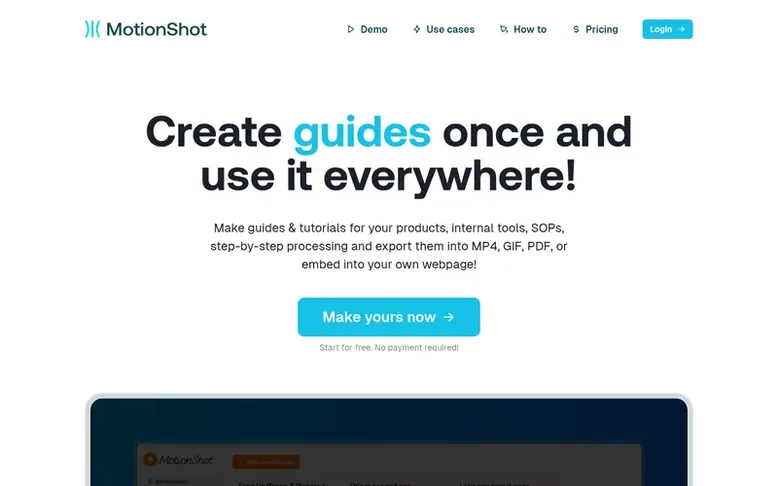
MotionShot: the homepage
MotionShot is a web-based platform for creating informative screen guides and walkthroughs without installation. Users upload screenshots, add annotated steps with customizable details, and publish guides that can be shared via links or embedded on websites.
Guides can be exported in multiple formats including MP4 videos, GIFs, PDFs, or ZIP files containing individual step images. The platform supports voice-overs, custom branding, custom domains, and hub pages that serve as publicly accessible collections of guides.
Use cases include help desk support, employee onboarding, content creation, standard operating procedures, and product tutorials. A Chrome extension allows automatic screenshot capture with clicks rather than manual screenshot taking.
Listed capabilities
- Screenshot upload and drag-and-drop functionality
- Step annotation with customizable colors
- Multiple export formats: MP4, GIF, PDF, ZIP
- Voice-over support
- Web embedding with iFrame code
- Shareable links for guide publishing
- Hub page for organizing published guides
- Chrome extension for automatic screenshot capture
Pricing
Pricing model: Freemium
Free plan: 2 guide generations with watermark. Paid plan: $147 for lifetime access with 300 guide generations per month, 22000 voice over characters per month, export to video, voice over, export to PDF & images, Chrome plugin, custom domain, custom branding, read mode, and analytics.
Compare and explore
Quick answers
What is a MotionShot walkthrough guide?
A MotionShot guide is a composition of images that demonstrates a step-by-step process with highlighted parts and annotations at each step. Guides can include highlighted shapes, voice-overs, and replace lengthy documentation with short pictorial form.
Do I need to install MotionShot on my computer?
No, MotionShot is a web application that requires no installation. However, a Chrome extension is available to help capture screens with clicks automatically.
What export formats are available for guides?
Guides can be exported as MP4 videos, GIFs, PDFs listing all step images, or ZIP files containing individual step images for repurposing in content, emails, and videos.
Can I embed MotionShot guides on my webpage?
Yes, after publishing a guide you can get an iFrame embed code to embed guides on any webpage, WordPress, Webflow, or Framer sites where iFrame is supported.
What is the MotionShot Hub?
Hub is a publicly accessible collection of guides available on paid plans. Users choose a custom handle and all published guides become accessible at https://motionshot.app/hub/, functioning as a help desk for customers or employees.
Find MotionShot online
Leave a review for MotionShot
No reviews listed for MotionShot yet. List the first one.
Listing a review is free. No one pays for reviews. See the listed reviews
List reviews · List updates · Share the list · Your tool? Claim this list entry · Report this list entry
MotionShot has a free listing. The owner can unlock the full profile with a paid launch for $5:
- Founder story (locked)
- Milestones (locked)
- Demo video (locked)
- Dofollow website link (locked)
Also on the list
-
Number 1: WhatPulse
Track keystrokes, clicks, applications and websites to understand your computer usage and productivity patterns
Productivity & Personal ToolsSince 2003
DR 54 no change since last check 0 votes. Log in to move WhatPulse up the list -
 Number 2: Start This Task
Break overwhelming tasks into one clear, doable first step
DR 4 no change since last check 0 votes. Log in to move Start This Task up the list -
 Number 3: Blocker
Website and app blocker for Mac with lock modes to prevent disabling blocks
DR 1 no change since last check 0 votes. Log in to move Blocker up the list -
 Number 4: Team Name Factory
Generate brand-ready team name ideas in seconds
DR 1 −1 (down) since last check 0 votes. Log in to move Team Name Factory up the list