
Workflow automation
Findest
Automatically organize email attachments with AI
- 0community votes
- 5DR by Ahrefs no change since last check
Ahrefs Domain Rating listed 19 Nov 2026, relisted 16 Nov 2026.
Findest uses AI to read email attachments and automatically file them into the correct folder in Google Drive, OneDrive, or Dropbox based on rules you write in
What it is
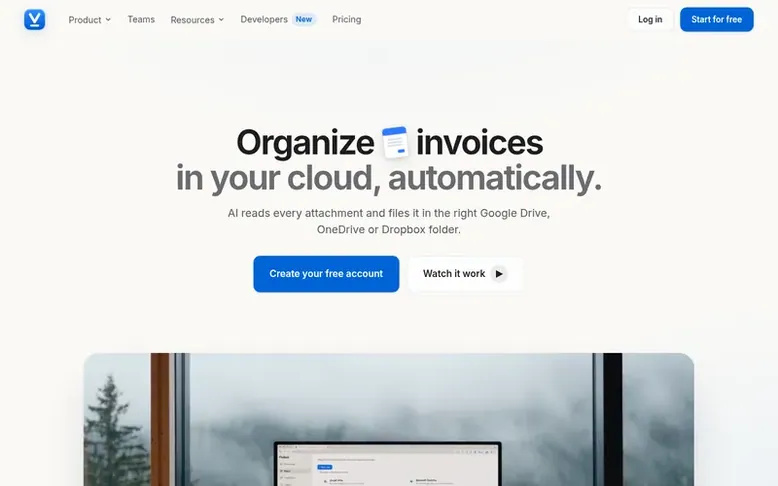
Findest: the homepage
Findest is an email-attachment archiver that uses AI to read attachments in your mailbox and file them automatically into your cloud storage. The service connects to Gmail, Outlook, or any IMAP mailbox in read-only mode and saves matching attachments to Google Drive, OneDrive, or Dropbox folders according to rules you describe in plain language.
The AI reads the entire document content—not just the filename—to classify each attachment correctly. You define filing rules by describing what goes where in natural language, such as "office electricity bills from Endesa." Findest compares each attachment against all your rules at once and files it to the designated folder, renaming it automatically based on document type, sender, and date.
Documents that don't match any rule stay in your History marked for review, so nothing is filed blindly. The service handles PDFs, images, Word documents, Excel files, text, and CSV files up to 25 MB. Every filing decision is logged with the reason, and automatic retries ensure documents aren't lost if a cloud service is temporarily unavailable.
Listed capabilities
- Read-only mailbox access for security
- Plain language rules without filters to maintain
- AI reads full document content, not just filenames
- Support for PDF, images, Word, Excel, text and CSV files up to 25 MB
- Automatic retries when filing fails
- Multiple cloud destination support
- Complete filing history with CSV export
- Archive past mail from last 30 days to 12 months
- Email alerts for failures and new sign-ins
- REST API and outgoing webhooks for integration
Pricing
Pricing model: Freemium
Free: €0 (2 rules, 30 files/month, 1 mailbox). Pro: €9/month or €90/year (15 rules, 500 files/month, unlimited mailboxes). Business: €29/month or €288/year (unlimited rules and files, multiple clouds). Teams Starter: €49/month or €490/year (5 people, 15 clients). Teams: €129/month or €1,290/year (15
Follow Findest for an email about each milestone, update and new product they post, in a daily summary.
Findest metrics
| Metric | Value |
|---|---|
| Domain Rating | 5 no change since last check |
| Trust Flow | 0 no change since last check |
| Citation Flow | 14 no change since last check |
| Referring domains | 9 no change since last check |
| External backlinks | 23 no change since last check |
Ahrefs Domain Rating listed 19 Nov 2026, relisted 16 Nov 2026. Majestic listed 16 Nov 2026, relisted 16 Nov 2026. Link data listed by Majestic. Trust Flow, Citation Flow and Topical Trust Flow are trademarks of Majestic-12 Ltd.
Findest domain listing data
Show the listing data
| Domain age | 8 months |
|---|---|
| Registered | |
| Expires | |
| Registrar | HOSTINGER operations, UAB |
| DNSSEC | Not signed |
Findest launch receipt entry
| Measure | At launch, then latest |
|---|---|
| Domain Rating (Ahrefs) | 5 to 5 no change since launch 16 Nov 2026, then 19 Nov 2026 |
| Trust Flow (Majestic) | 0 first measured 16 Nov 2026 |
| Referring domains (Majestic) | 9 first measured 16 Nov 2026 |
Day 3 since launch. Next receipt: day 30, 16 Dec 2026. We show what changed, not what caused it: many things affect these numbers. Nothing here is estimated.
Before you launch
The playbook on SaaS Directory List lists what to prepare, what to post on launch day and where else to list your product.
Compare and explore
Quick answers
Do you have access to my email?
Findest connects with read-only access and only looks at messages with attachments. Mail without attachments is skipped, and the message body is never stored. You can revoke access anytime from Connections or your email provider.
What file formats does Findest support?
Findest reads PDF, images (JPG, PNG, WEBP, HEIC), Word and Excel files (DOCX, XLSX), plain text and CSV files, from 3 KB to 25 MB per attachment. Scanned PDFs and photos of documents work too because the model reads the image content.
Can I use Google Drive, OneDrive, and Dropbox at the same time?
Yes. You can connect multiple clouds and choose which cloud each rule files into. On Google Drive, Findest only sees folders you pick. On OneDrive and Dropbox, it can write anywhere in your account.
What happens if no rule matches a document?
Documents that don't match any rule are never filed. Instead, they stay in your History marked 'no rule matched' with the reason, so you can review and adjust your rules. This ensures nothing is filed blindly.
How often does Findest check for new emails?
Gmail and other IMAP mailboxes are checked every 5 minutes, while Outlook notifies Findest immediately when mail arrives. An attachment is normally in its folder within 5 minutes of reaching you.
Leave a review for Findest
No reviews listed for Findest yet. List the first one.
Listing a review is free. No one pays for reviews. See the listed reviews
List reviews · List updates · Share the list · Your tool? Claim this list entry · Report this list entry
Findest has a free listing. The owner can unlock the full profile with a paid launch for $5:
- Founder story (locked)
- Milestones (locked)
- Demo video (locked)
- Dofollow website link: not on this free listing (its website link is nofollow)
Also on the list
-
DR 18 +18 (up) since last check 2 votes. Log in to move Hashmedo up the list
-
 Number 2: Creepless
Scope creep tool that turns client requests into approved quotes or included work
DR 4 +1 (up) since last check 0 votes. Log in to move Creepless up the list -
 Number 3: Resolve
Workflow automation and orchestration platform for IT teams
Workflow automationUnited States
DR 62 no change since last check 0 votes. Log in to move Resolve up the list -
 Number 4: HuLoop Automation
Unified work optimization platform powered by AI-driven intelligent agents
Workflow automationUnited States
DR 28 +1 (up) since last check 0 votes. Log in to move HuLoop Automation up the list
