
Remote work
Couchside
Phone remote, controller and dashboard for your gaming PC
- 0community votes
- 9DR by Ahrefs +1 (up) since last check
Ahrefs Domain Rating listed 19 Nov 2026, relisted 16 Nov 2026.
Turn your phone into a remote, controller and dashboard for your gaming PC on SteamOS, Bazzite, CachyOS, Steam Deck or Windows, with live system vitals and
What it is
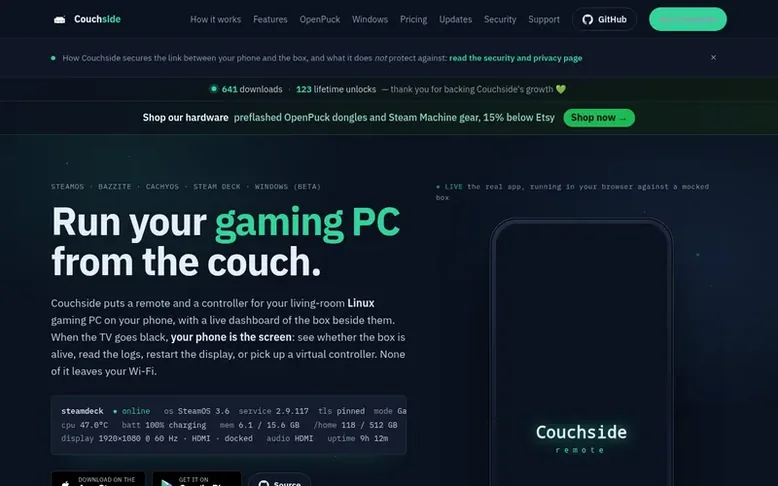
Couchside: the homepage
Couchside is a mobile app that connects to a small service installed on your gaming PC over your local network. It provides a live dashboard showing CPU temperature, memory usage, GPU status, and display information refreshed every few seconds. When your TV screen goes black, your phone becomes an alternative screen to diagnose problems and restart the display without leaving the couch.
The app includes a virtual Xbox-compatible controller, air mouse control using your phone's gyroscope, and input options including a touchpad and keyboard. You can switch between Desktop and Game Mode with one tap, manage audio output, and control compatible smart TVs including LG webOS, Roku, Android TV and Hisense over Wi-Fi.
Couchside is designed for local network only with no cloud relay required. The service runs as a small Python application with no dependencies, pairing via PIN or QR code with no IP addresses or tokens to manage. The box service is fully open source under MIT license, while the app is source-available for personal noncommercial use.
Listed capabilities
- Live dashboard with CPU temperature, memory, GPU and display status
- Virtual Xbox controller with haptics
- Air Mouse using phone gyroscope
- Rescue actions: restart display, reboot, power off
- Remote desktop with hardware-decoded H.264
- Smart TV control for LG, Roku, Android TV and Hisense
- Audio output switching between HDMI, Bluetooth and built-in
- PIN and QR code pairing without IP addresses
- Decky Loader management from phone
Pricing
Pricing model: Free trial
Free for 7 days, then $7.99 USD one-time unlock. Or build the source-available app yourself for free.
Follow Couchside for an email about each milestone, update and new product they post, in a daily summary.
Couchside metrics
| Metric | Value |
|---|---|
| Domain Rating | 9 +1 (up) since last check |
| Trust Flow | 4 no change since last check |
| Citation Flow | 16 no change since last check |
| Referring domains | 7 no change since last check |
| External backlinks | 21 no change since last check |
Ahrefs Domain Rating listed 19 Nov 2026, relisted 16 Nov 2026. Listed under topic: Society/People (4). Majestic listed 14 Nov 2026, relisted 14 Nov 2026. Link data listed by Majestic. Trust Flow, Citation Flow and Topical Trust Flow are trademarks of Majestic-12 Ltd.
Couchside domain listing data
Show the listing data
| Domain age | 4 months |
|---|---|
| Registered | |
| Expires | |
| Registrar | Cloudflare, Inc. |
| DNSSEC | Not signed |
Couchside launch receipt entry
| Measure | At launch, then latest |
|---|---|
| Domain Rating (Ahrefs) | 8 to 9 +1 (up) since launch 14 Nov 2026, then 19 Nov 2026 |
| Trust Flow (Majestic) | 4 first measured 14 Nov 2026 |
| Referring domains (Majestic) | 7 first measured 14 Nov 2026 |
Day 6 since launch. Next receipt: day 30, 14 Dec 2026. We show what changed, not what caused it: many things affect these numbers. Nothing here is estimated.
Before you launch
The playbook on SaaS Directory List lists what to prepare, what to post on launch day and where else to list your product.
Compare and explore
Quick answers
Does Couchside require an internet connection?
No. Your phone and gaming PC communicate only over your local Wi-Fi network. Optional integrations with Steam and IsThereAnyDeal use internet services, but core control is completely LAN-only.
What operating systems does Couchside support?
The app runs on iOS and Android. The service runs on Linux (SteamOS, Bazzite, CachyOS, Steam Deck) and Windows 10/11 beta.
Can I build Couchside myself instead of buying it?
Yes. The service is fully open source (MIT license). The app is source-available for personal noncommercial use, so you can compile it yourself with Expo and run it for free. The one-time price buys the ready-made App Store or Play Store version with updates.
How do I get support for Couchside?
File an issue on GitHub at github.com/emerytech/couchside/issues or email support@couchside.tv. As a small independent project, you will reach a real person, usually answered the same day.
Leave a review for Couchside
No reviews listed for Couchside yet. List the first one.
Listing a review is free. No one pays for reviews. See the listed reviews
List reviews · List updates · Share the list · Your tool? Claim this list entry · Report this list entry
Couchside has a free listing. The owner can unlock the full profile with a paid launch for $5:
- Founder story (locked)
- Milestones (locked)
- Demo video (locked)
- Dofollow website link: not on this free listing (its website link is nofollow)
Also on the list
-
DR 5 no change since last check 0 votes. Log in to move Remoqa up the list
-
Number 2: Nexjoin
A rethought remote desktop system prioritizing simplicity, security, and user privacy
Remote workHungary
DR 0 −1 (down) since last check 0 votes. Log in to move Nexjoin up the list -
DR 4 +1 (up) since last check 0 votes. Log in to move Castpane up the list
-
 Number 4: CLIAnywhere
Remote terminal access for your own PC from iPhone, Android or the web with persistent sessions and no port forwarding required
DR 0 no change since last check 0 votes. Log in to move CLIAnywhere up the list