
Productivity & Personal Tools
Yellow Tomato
Free online Pomodoro timer for focus sessions
- 0community votes
- 30DR by Ahrefs −1 (down) since last check
Ahrefs Domain Rating listed 6 Nov 2026, relisted 31 Oct 2026.
A free browser-based Pomodoro timer with customizable focus sessions from 5 to 60 minutes, progress tracking, and an optional Chrome extension with site
What it is
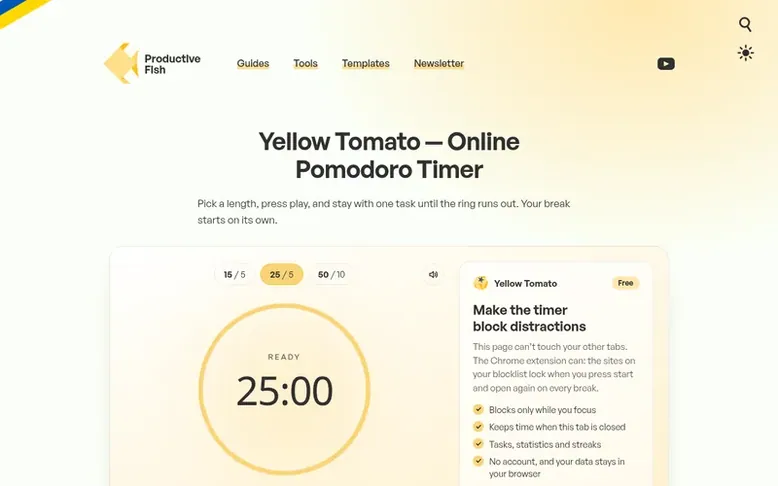
Yellow Tomato: the homepage
Yellow Tomato is a free online Pomodoro timer designed to improve focus and productivity. It runs directly in your browser and allows you to set focus sessions ranging from 5 to 60 minutes in 5-minute increments. The timer tracks completed Pomodoros through a visual progress counter, and remembers running sessions even if you reload the page or switch tabs.
The tool is based on the Pomodoro Technique created by Francesco Cirillo, with support for the classic 25-minute work interval followed by a 5-minute break, as well as longer variations like 50-minute sessions. For added functionality, an optional Chrome extension is available that places the timer in your browser toolbar and blocks distracting websites during focus sessions.
Both the web timer and Chrome extension are completely free and require no account creation, keeping all data stored locally in your browser.
Listed capabilities
- Customizable timer from 5 to 60 minutes in 5-minute steps
- Progress tracking with visual Pomodoro counter
- Timer persists when switching browser tabs
- Automatic sound notification when session ends
- Chrome extension with website blocking
- No account required
Pricing
Pricing model: Free
Follow Yellow Tomato for an email about each milestone, update and new product they post, in a daily summary.
Yellow Tomato metrics
| Metric | Value |
|---|---|
| Domain Rating | 30 −1 (down) since last check |
| Trust Flow | 6 no change since last check |
| Citation Flow | 31 no change since last check |
| Referring domains | 158 no change since last check |
| External backlinks | 446 no change since last check |
Ahrefs Domain Rating listed 6 Nov 2026, relisted 31 Oct 2026. Listed under topic: Computers/Open Source (6). Majestic listed 25 Oct 2026, relisted 25 Oct 2026. Link data listed by Majestic. Trust Flow, Citation Flow and Topical Trust Flow are trademarks of Majestic-12 Ltd.
Yellow Tomato domain listing data
Show the listing data
| Domain age | 6 years |
|---|---|
| Registered | |
| Expires | |
| Registrar | GoDaddy.com, LLC |
| DNSSEC | Not signed |
Yellow Tomato launch receipt entry
| Measure | At launch, then latest |
|---|---|
| Domain Rating (Ahrefs) | 31 to 30 −1 (down) since launch 25 Oct 2026, then 6 Nov 2026 |
| Trust Flow (Majestic) | 6 first measured 25 Oct 2026 |
| Referring domains (Majestic) | 158 first measured 25 Oct 2026 |
Day 11 since launch. Next receipt: day 30, 24 Nov 2026. We show what changed, not what caused it: many things affect these numbers. Nothing here is estimated.
Before you launch
The playbook on SaaS Directory List lists what to prepare, what to post on launch day and where else to list your product.
Compare and explore
Quick answers
How does this Pomodoro timer work?
Press play to start a focus session and the timer counts down to zero and plays a sound. Each finished session adds a tomato under Progress so you can see how many Pomodoros you have done today.
Can I change the timer length?
Yes. You can use the Settings slider to set any length from 5 to 60 minutes in 5-minute steps. For breaks, set the slider to 5 minutes and start the timer again.
Does the timer keep running in a background tab?
Yes. The timer counts from the moment you pressed play rather than ticking along with the page, so switching tabs does not slow it down. It also remembers a running session if you reload the page.
What does the Yellow Tomato Chrome extension add?
The extension puts the timer in your browser toolbar and blocks sites on your blocklist while a focus session runs. It is free, needs no account, and keeps your data in your browser.
Leave a review for Yellow Tomato
No reviews listed for Yellow Tomato yet. List the first one.
Listing a review is free. No one pays for reviews. See the listed reviews
List reviews · List updates · Share the list · Your tool? Claim this list entry · Report this list entry
Yellow Tomato has a free listing. The owner can unlock the full profile with a paid launch for $5:
- Founder story (locked)
- Milestones (locked)
- Demo video (locked)
- Dofollow website link (locked)
Also on the list
-
 Number 1: Omphalis
A workspace for reading articles, PDFs, videos and podcasts with AI explanations and cross-source questions
Productivity & Personal ToolsUnited StatesSince 2026
DR 43 +1 (up) since last check 1 votes. Log in to move Omphalis up the list -
 Number 2: MeetNote
AI Meeting Notes That Turn Conversations Into Action
DR 0 no change since last check 0 votes. Log in to move MeetNote up the list -
Number 3: Playlist Exporter
Export YouTube playlists to CSV, Excel, JSON and 10 more formats
DR 0 no change since last check 0 votes. Log in to move Playlist Exporter up the list -
 Number 4: Scappi
Recipe box for organizing recipes from links, photos and cookbooks
Productivity & Personal ToolsEstoniaSince 2026
DR 0 no change since last check 0 votes. Log in to move Scappi up the list