
Productivity & Personal Tools
Whizra
A private assistant for Mac that compresses, converts, merges and zips files offline by typing one sentence
- 0community votes
- 0DR by Ahrefs no change since last check
Ahrefs Domain Rating listed 19 Nov 2026, relisted 13 Nov 2026.
A Mac menu-bar app where you type what you want done to your files and it processes them locally without uploading.
What it is
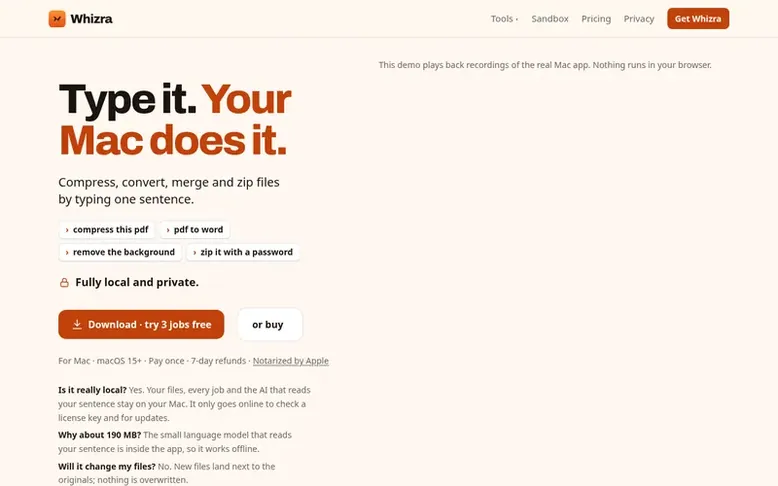
Whizra: the homepage
Whizra is a desktop utility for Mac that lets you compress PDFs, convert file formats, merge documents, create password-protected zips, and organize files by typing plain English instructions. Every job runs entirely on your computer without uploading files to servers, using an AI language model built into the app. It includes tools for PDF manipulation, image conversion, file organization, and Mac shortcuts, with new features added through free updates. The app works offline, never overwrites original files, and requires no account or subscription.
Listed capabilities
- PDF compression and manipulation (compress, merge, split, rotate, add page numbers, password protect, remove passwords, make scans searchable, extract images)
- Convert files to and from PDF formats (Word, PowerPoint, Excel, photos to PDF)
- Image conversion and editing (HEIC to JPG, WebP to PNG, resize, remove location data, remove background)
- Create password-protected ZIP files with AES-256 encryption and unzip RAR and 7z files
- Find, organize and batch rename files with AI assistance
- Mac shortcuts for window and app management
- Convert lecture slides to notes
- Works offline and keeps files private on your Mac
- 7-day refund period with no questions asked
- One license key works on up to 3 Macs
Pricing
Pricing model: Paid
First 50 buyers $9.99, next 50 buyers $14.99, after that $19.99. One license key works on 3 Macs. 3 jobs free before purchase.
Follow Whizra for an email about each milestone, update and new product they post, in a daily summary.
Whizra metrics
| Metric | Value |
|---|---|
| Domain Rating | 0 no change since last check |
| Trust Flow | 0 no change since last check |
| Citation Flow | 7 no change since last check |
| Referring domains | 4 no change since last check |
| External backlinks | 5 no change since last check |
Ahrefs Domain Rating listed 19 Nov 2026, relisted 13 Nov 2026. Majestic listed 13 Nov 2026, relisted 13 Nov 2026. Link data listed by Majestic. Trust Flow, Citation Flow and Topical Trust Flow are trademarks of Majestic-12 Ltd.
Whizra domain listing data
Show the listing data
| Domain age | 21 days |
|---|---|
| Registered | |
| Expires | |
| Registrar | Spaceship, Inc. |
| DNSSEC | Signed |
Whizra launch receipt entry
| Measure | At launch, then latest |
|---|---|
| Domain Rating (Ahrefs) | 0 to 0 no change since launch 13 Nov 2026, then 19 Nov 2026 |
| Trust Flow (Majestic) | 0 first measured 13 Nov 2026 |
| Referring domains (Majestic) | 4 first measured 13 Nov 2026 |
Day 6 since launch. Next receipt: day 30, 13 Dec 2026. We show what changed, not what caused it: many things affect these numbers. Nothing here is estimated.
Before you launch
The playbook on SaaS Directory List lists what to prepare, what to post on launch day and where else to list your product.
Compare and explore
Quick answers
Do my files get uploaded?
No. All jobs, file finding, and the AI that reads your sentence run on your Mac. It only goes online to check your license key with the payment provider and about once a week, plus a daily update check that you can disable in Settings.
Does it work offline?
Yes. All file processing jobs run on your Mac, and the weekly license key check does not lock you out when offline.
Will it change or delete my files?
No. All jobs write new files next to the originals and never overwrite or delete them. The rename and move operations can be undone.
What is Whizra?
A private assistant for Mac that runs entirely on your computer. You type what you want done in one sentence (“compress this PDF”, “merge these”, “zip it with a password”) and Whizra does it offline, without uploading files. It starts with everyday file jobs (PDFs, Word, images, zips, organizing files) and gains new abilities through free updates. One-time purchase, a download with a license key for 3 Macs.
Can I try it before I buy?
Try the demo above or the sandbox: they play back real runs of the app. Or download the app: your first 3 jobs are free, and finding files, asking about a file, renaming and moving stay free after that. And you have 7 days to ask for a refund, no questions.
Leave a review for Whizra
No reviews listed for Whizra yet. List the first one.
Listing a review is free. No one pays for reviews. See the listed reviews
List reviews · List updates · Share the list · Your tool? Claim this list entry · Report this list entry
Whizra has a free listing. The owner can unlock the full profile with a paid launch for $5:
- Founder story (locked)
- Milestones (locked)
- Demo video (locked)
- Dofollow website link: not on this free listing (its website link is nofollow)
Also on the list
-
 Number 1: Slap Alert
A Mac menu bar app that shows sale notifications with a pixel monkey
Productivity & Personal ToolsCanadaVerified
DR 8 +1 (up) since last check 4 votes. Log in to move Slap Alert up the list -
 Number 2: TidyList™
YouTube playlist manager, organizer and cleaner
Productivity & Personal ToolsUnited KingdomVerified
DR 7 +1 (up) since last check 3 votes. Log in to move TidyList™ up the list -
Number 3: Ordr
ADHD-friendly AI task manager that turns brain dumps into clear plans
DR 20 −1 (down) since last check 1 votes. Log in to move Ordr up the list -
 Number 4: Omphalis
A workspace for reading articles, PDFs, videos and podcasts with AI explanations and cross-source questions
Productivity & Personal ToolsUnited StatesSince 2026
DR 37 −9 (down) since last check 1 votes. Log in to move Omphalis up the list