
Productivity & Personal Tools
VibePause
A Mac break reminder for developers that follows your coding sessions and guides short breaks
- 0community votes
- 3DR by Ahrefs +1 (up) since last check
Ahrefs Domain Rating listed 6 Nov 2026, relisted 26 Oct 2026.
VibePause is a menu bar app for macOS that tracks coding sessions in developer tools and reminds you to take guided eye, posture, and breathing breaks, with an
What it is
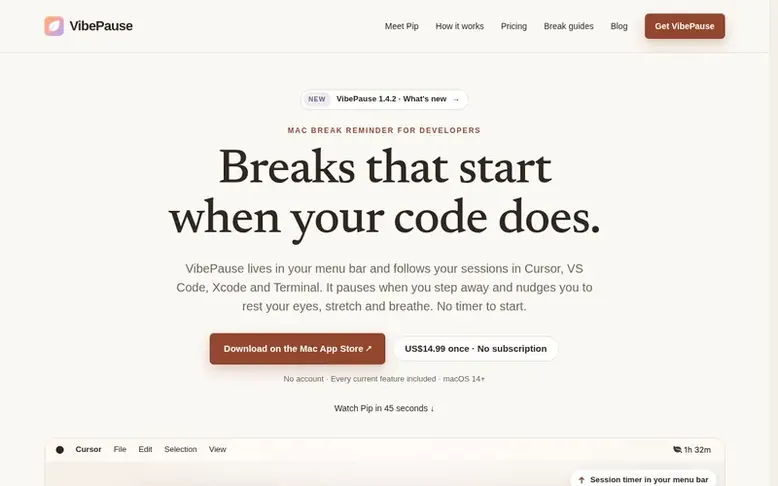
VibePause: the homepage
VibePause is a paid macOS application that sits in your menu bar and automatically tracks active coding time across multiple developer tools including Cursor, VS Code, Xcode, Terminal, and others. It uses idle detection to pause tracking when you step away from your work.
The app delivers contextual reminders for eye care, posture, hydration, movement, and breathing at sensible moments based on how long you've been coding. When you receive a nudge, you can start a guided break, snooze for 30 minutes, or dismiss it. VibePause includes four types of guided breaks: 20-second eye resets, 1-minute stretches, 2-minute breathing exercises, and 2-minute body scans.
Pip is an optional desk companion that sits above your Dock, mirrors your coding session state, delivers reminders in a speech bubble, and joins you in guided breaks with animated poses and synthesized voice sounds. You can customize Pip's appearance, voice, position, and behavior.
All data stays on your Mac locally. The app offers optional weather context when you enter a city, optional analytics with your consent, and no account is required. Features include Focus Blocks for deep work, Quiet Hours to prevent reminders, progress tracking, nine themes, and extensive privacy controls.
Listed capabilities
- Idle detection that pauses and resumes sessions
- Pip desk companion that mirrors session state and joins breaks
- Quiet Hours to prevent reminders during specific times
- Progress tracking showing breaks taken, reminder responses, and session history
- Optional weather context that shows outdoor nudges based on weather and daylight
Pricing
Pricing model: Paid
US$14.99 one-time purchase for all current features, including Pip, guided breaks, Focus Blocks, progress tracking, and themes. Available on Mac App Store with local pricing.
Follow VibePause for an email about each milestone, update and new product they post, in a daily summary.
VibePause metrics
| Metric | Value |
|---|---|
| Domain Rating | 3 +1 (up) since last check |
| Trust Flow | 3 no change since last check |
| Citation Flow | 13 no change since last check |
| Referring domains | 2 no change since last check |
| External backlinks | 3 no change since last check |
Ahrefs Domain Rating listed 6 Nov 2026, relisted 26 Oct 2026. Listed under topic: Society/People (2). Majestic listed 25 Oct 2026, relisted 25 Oct 2026. Link data listed by Majestic. Trust Flow, Citation Flow and Topical Trust Flow are trademarks of Majestic-12 Ltd.
VibePause domain listing data
Show the listing data
| Domain age | 7 months |
|---|---|
| Registered | |
| Expires | |
| Registrar | Namecheap Inc. |
| DNSSEC | Not signed |
VibePause launch receipt entry
| Measure | At launch, then latest |
|---|---|
| Domain Rating (Ahrefs) | 2 to 3 +1 (up) since launch 25 Oct 2026, then 6 Nov 2026 |
| Trust Flow (Majestic) | 3 first measured 25 Oct 2026 |
| Referring domains (Majestic) | 2 first measured 25 Oct 2026 |
Day 11 since launch. Next receipt: day 30, 24 Nov 2026. We show what changed, not what caused it: many things affect these numbers. Nothing here is estimated.
Before you launch
The playbook on SaaS Directory List lists what to prepare, what to post on launch day and where else to list your product.
Compare and explore
Quick answers
How is VibePause different from a manual break timer?
VibePause automatically follows time in selected developer apps and pauses with idle detection, combining session-based reminders with guided breaks and local history. It also offers manual Focus Blocks when you want a named countdown.
What does VibePause monitor?
VibePause uses foreground app identity, idle state, and session timing to track when you are coding. It does not read your code or record keystrokes, and the setup flow explains the permissions needed for session detection.
Does my data leave my Mac?
Your session history and settings stay locally on your Mac. Optional city context uses online weather services, and optional analytics are sent only with your consent. See the privacy policy for details.
Who is Pip and can I turn it off?
Pip is an optional desk companion that sits at the bottom of your screen, mirrors your coding session, brings reminders in a speech bubble, and joins guided breaks. It is off by default and you can turn it on or off anytime from the menu bar.
Which Macs does VibePause support?
VibePause is for macOS 14 and newer. Check the Mac App Store listing for compatibility with your specific Mac.
Leave a review for VibePause
No reviews listed for VibePause yet. List the first one.
Listing a review is free. No one pays for reviews. See the listed reviews
List reviews · List updates · Share the list · Your tool? Claim this list entry · Report this list entry
VibePause has a free listing. The owner can unlock the full profile with a paid launch for $5:
- Founder story (locked)
- Milestones (locked)
- Demo video (locked)
- Dofollow website link (locked)
Also on the list
-
 Number 1: Omphalis
A workspace for reading articles, PDFs, videos and podcasts with AI explanations and cross-source questions
Productivity & Personal ToolsUnited StatesSince 2026
DR 43 +1 (up) since last check 1 votes. Log in to move Omphalis up the list -
 Number 2: MeetNote
AI Meeting Notes That Turn Conversations Into Action
DR 0 no change since last check 0 votes. Log in to move MeetNote up the list -
Number 3: Playlist Exporter
Export YouTube playlists to CSV, Excel, JSON and 10 more formats
DR 0 no change since last check 0 votes. Log in to move Playlist Exporter up the list -
 Number 4: Scappi
Recipe box for organizing recipes from links, photos and cookbooks
Productivity & Personal ToolsEstoniaSince 2026
DR 0 no change since last check 0 votes. Log in to move Scappi up the list