
Productivity & Personal Tools
StepCapture
Turn clicks into instant, editable step-by-step guides
- 0community votes
- 25DR by Ahrefs no change since last check
Ahrefs Domain Rating listed 6 Nov 2026, relisted 25 Oct 2026.
A browser extension that automatically captures workflows and converts them into clear, shareable step-by-step guides with smart screenshots and privacy
What it is
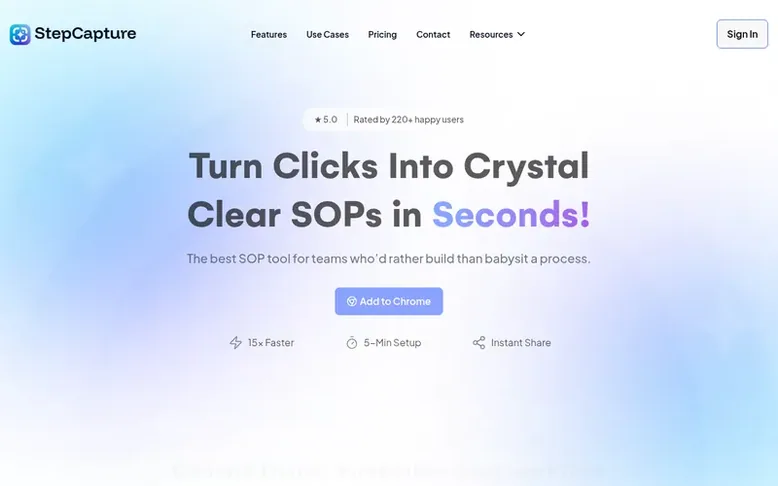
StepCapture: the homepage
StepCapture is a workflow documentation tool that records user actions and automatically generates professional step-by-step guides. The Chrome extension captures every click, keystroke, and page navigation, creating polished SOPs without manual work. It features smart screenshots with auto-blur for sensitive data, customizable guides, and secure sharing via encrypted links. Teams can organize captures into searchable knowledge bases and publish professional documentation hubs accessible 24/7. The tool eliminates manual documentation, reducing the time to create guides from hours to minutes.
Listed capabilities
- One-click workflow recording
- Smart screenshots for every action
- Detailed action tracking
- Advanced blur system for sensitive data
- Secure and simple sharing
- Knowledge base organization
- Custom branding options
- Password-protected sharing
- AI-powered step descriptions
- Export to PDF, HTML, and documentation platforms
Pricing
Pricing model: Freemium
Basic: Free forever with 25 captures, shareable link, and 3 Knowledge Base. Pro: $10/month per member (or $8/month billed yearly) with unlimited captures, advanced screenshot customization, and 10 Knowledge Base. Ultimate: $15/month per member (or $12/month billed yearly) with password protection, c
Follow StepCapture for an email about each milestone, update and new product they post, in a daily summary.
StepCapture metrics
| Metric | Value |
|---|---|
| Domain Rating | 25 no change since last check |
| Trust Flow | 16 no change since last check |
| Citation Flow | 17 no change since last check |
| Referring domains | 148 no change since last check |
| External backlinks | 269 no change since last check |
Ahrefs Domain Rating listed 6 Nov 2026, relisted 25 Oct 2026. Listed under topic: Recreation/Travel (16). Majestic listed 25 Oct 2026, relisted 25 Oct 2026. Link data listed by Majestic. Trust Flow, Citation Flow and Topical Trust Flow are trademarks of Majestic-12 Ltd.
StepCapture domain listing data
Show the listing data
| Domain age | 1 year |
|---|---|
| Registered | |
| Expires | |
| Registrar | Cloudflare, Inc. |
| DNSSEC | Not signed |
StepCapture launch receipt entry
| Measure | At launch, then latest |
|---|---|
| Domain Rating (Ahrefs) | 25 to 25 no change since launch 25 Oct 2026, then 6 Nov 2026 |
| Trust Flow (Majestic) | 16 first measured 25 Oct 2026 |
| Referring domains (Majestic) | 148 first measured 25 Oct 2026 |
Day 11 since launch. Next receipt: day 30, 24 Nov 2026. We show what changed, not what caused it: many things affect these numbers. Nothing here is estimated.
Before you launch
The playbook on SaaS Directory List lists what to prepare, what to post on launch day and where else to list your product.
Compare and explore
Quick answers
What is StepCapture, and how does it work?
StepCapture is a Chrome extension that automatically captures your workflow as you work. You start recording, perform your actions normally, and StepCapture records every click, page navigation, and keystroke. It automatically generates clear, step-by-step guides with screenshots, URLs, and action logs without requiring any manual typing or setup.
Who can benefit from using StepCapture?
StepCapture benefits teams across all industries who need to create documentation, onboarding guides, training materials, and SOPs. This includes businesses scaling operations, agencies managing client workflows, event management companies, manufacturing firms, catering services, design agencies, and educational institutions.
Do I need technical skills to use StepCapture?
No technical skills are required. StepCapture is designed to be extremely user-friendly with a 5-minute onboarding time. You simply install the Chrome extension, click start recording, and perform your workflow naturally. The tool automatically handles all the documentation work without needing any technical knowledge.
How secure is sharing my guides with StepCapture?
StepCapture provides multiple security features including secure cloud hosting, encrypted sharing links, password protection on higher plans, and an advanced blur system that automatically detects and masks sensitive information like emails, numbers, and form fields. You can control access permissions for each share.
Can I customize the guides I create with StepCapture?
Yes, StepCapture guides are fully customizable. You can edit captures, add empty steps, customize click indicator colors and sizes, add custom branding (on higher plans), and connect your own domain. You can also organize captures into knowledge bases with categories and descriptions.
Leave a review for StepCapture
No reviews listed for StepCapture yet. List the first one.
Listing a review is free. No one pays for reviews. See the listed reviews
List reviews · List updates · Share the list · Your tool? Claim this list entry · Report this list entry
StepCapture has a free listing. The owner can unlock the full profile with a paid launch for $5:
- Founder story (locked)
- Milestones (locked)
- Demo video (locked)
- Dofollow website link (locked)
Also on the list
-
 Number 1: Omphalis
A workspace for reading articles, PDFs, videos and podcasts with AI explanations and cross-source questions
Productivity & Personal ToolsUnited StatesSince 2026
DR 43 +1 (up) since last check 1 votes. Log in to move Omphalis up the list -
 Number 2: MeetNote
AI Meeting Notes That Turn Conversations Into Action
DR 0 no change since last check 0 votes. Log in to move MeetNote up the list -
Number 3: Playlist Exporter
Export YouTube playlists to CSV, Excel, JSON and 10 more formats
DR 0 no change since last check 0 votes. Log in to move Playlist Exporter up the list -
 Number 4: Scappi
Recipe box for organizing recipes from links, photos and cookbooks
Productivity & Personal ToolsEstoniaSince 2026
DR 0 no change since last check 0 votes. Log in to move Scappi up the list