
Productivity & Personal Tools
ScreenFine
The screen time app that locks your apps at the OS level when you go over your daily limit. Earn them back with pushups.
- 0community votes
- 14DR by Ahrefs +1 (up) since last check
- 2026founded
Ahrefs Domain Rating listed 6 Nov 2026, relisted 6 Nov 2026.
An iOS app that locks apps when you exceed your daily screen time limit and requires verified physical activity to unlock them.
What it is
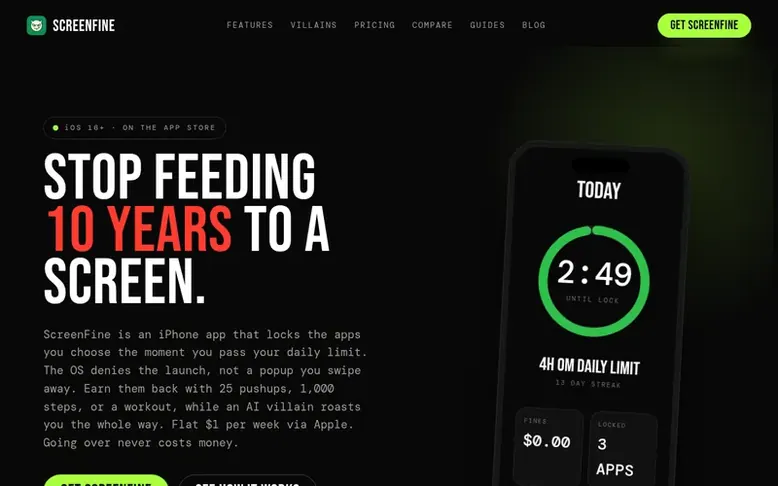
ScreenFine: the homepage
ScreenFine is an iOS screen time accountability app that sets daily app usage limits and locks apps using Apple's Family Controls when you exceed them. Instead of charging money for overages, you must complete verified actions to unlock apps: 25 camera-counted pushups, 1,000 steps, 25 squats, or 10 mindful minutes. The app features AI villains that deliver personalized roasts for each overage, and an optional social Wall of Shame leaderboard. Subscriptions cost $1 per week with a 7-day free trial, and no variable charges apply regardless of how many times you exceed your limit.
Listed capabilities
- OS-level app locking via Apple Family Controls
- Multiple redemption options including steps and mindful minutes
- AI villain roasts on every overage
- Customizable daily app limits
- Streak tracking and weekly score
- Optional Wall of Shame social leaderboard
- Lock pause for travel and sick days
- Six customizable villain personalities
- Verified Apple Watch workout integration
Pricing
Pricing model: Free trial
$1 per week via Apple In-App Purchase after a 7-day free trial. Also available at $3.99 per month or $40.49 per year. No additional charges for exceeding daily limits.
Follow ScreenFine for an email about each milestone, update and new product they post, in a daily summary.
ScreenFine metrics
| Metric | Value |
|---|---|
| Domain Rating | 14 +1 (up) since last check |
| Trust Flow | 8 no change since last check |
| Citation Flow | 20 no change since last check |
| Referring domains | 31 no change since last check |
| External backlinks | 94 no change since last check |
Ahrefs Domain Rating listed 6 Nov 2026, relisted 6 Nov 2026. Listed under topic: Computers/Internet/On the Web (7). Majestic listed 25 Oct 2026, relisted 25 Oct 2026. Link data listed by Majestic. Trust Flow, Citation Flow and Topical Trust Flow are trademarks of Majestic-12 Ltd.
ScreenFine domain listing data
Show the listing data
| Domain age | 7 months |
|---|---|
| Registered | |
| Expires | |
| Registrar | GoDaddy.com, LLC |
| DNSSEC | Not signed |
ScreenFine launch receipt entry
| Measure | At launch, then latest |
|---|---|
| Domain Rating (Ahrefs) | 13 to 14 +1 (up) since launch 25 Oct 2026, then 6 Nov 2026 |
| Trust Flow (Majestic) | 8 first measured 25 Oct 2026 |
| Referring domains (Majestic) | 31 first measured 25 Oct 2026 |
Day 11 since launch. Next receipt: day 30, 24 Nov 2026. We show what changed, not what caused it: many things affect these numbers. Nothing here is estimated.
Before you launch
The playbook on SaaS Directory List lists what to prepare, what to post on launch day and where else to list your product.
Compare and explore
Quick answers
Do you charge money for going over my daily limit?
No. The only charge is the $1/week subscription via Apple In-App Purchase. Overages are paid in pushups, steps, squats, or mindful minutes, not dollars. Your wallet is never touched regardless of how many times you exceed your limit.
How is this different from other screen time apps like Opal, Brick, or One Sec?
Those apps add friction or dismiss-able timers that eventually lose effectiveness. ScreenFine enforces a real OS-level lock at the operating system level that you earn back with verified effort, combined with AI accountability roasts. It is a consequence, not a speed bump.
Can I cancel my subscription anytime?
Yes. Cancel through iPhone Settings > [your name] > Subscriptions > ScreenFine > Cancel, or from inside the app. Cancellation takes effect at the end of your current weekly billing period with no penalty.
How do I clear a lock that has been triggered?
Open the ScreenFine app and the redemption screen will surface immediately. Complete your chosen action: 25 camera-verified pushups, 1,000 steps, 25 squats, or 10 mindful minutes. Apps unlock the moment verification completes.
Is there a free tier or trial?
No permanent free tier, but every new account gets a 7-day free trial of full access. Cancel before day 7 and you pay nothing. A permanent free tier would defeat the design because the mechanism only works when you have real skin in the game.
Leave a review for ScreenFine
No reviews listed for ScreenFine yet. List the first one.
Listing a review is free. No one pays for reviews. See the listed reviews
List reviews · List updates · Share the list · Your tool? Claim this list entry · Report this list entry
ScreenFine has a free listing. The owner can unlock the full profile with a paid launch for $5:
- Founder story (locked)
- Milestones (locked)
- Demo video (locked)
- Dofollow website link (locked)
Also on the list
-
 Number 1: Omphalis
A workspace for reading articles, PDFs, videos and podcasts with AI explanations and cross-source questions
Productivity & Personal ToolsUnited StatesSince 2026
DR 43 +1 (up) since last check 1 votes. Log in to move Omphalis up the list -
 Number 2: MeetNote
AI Meeting Notes That Turn Conversations Into Action
DR 0 no change since last check 0 votes. Log in to move MeetNote up the list -
Number 3: Playlist Exporter
Export YouTube playlists to CSV, Excel, JSON and 10 more formats
DR 0 no change since last check 0 votes. Log in to move Playlist Exporter up the list -
 Number 4: Scappi
Recipe box for organizing recipes from links, photos and cookbooks
Productivity & Personal ToolsEstoniaSince 2026
DR 0 no change since last check 0 votes. Log in to move Scappi up the list