
Productivity & Personal Tools
PerchDeck
A notch app for Windows with 13 everyday tools
- 0community votes
- 9DR by Ahrefs +1 (up) since last check
Ahrefs Domain Rating listed 6 Nov 2026, relisted 1 Nov 2026.
A Windows desktop app with a small notch at the edge of your screen that opens into a panel of 13 everyday tools including clipboard history, paste stack
What it is
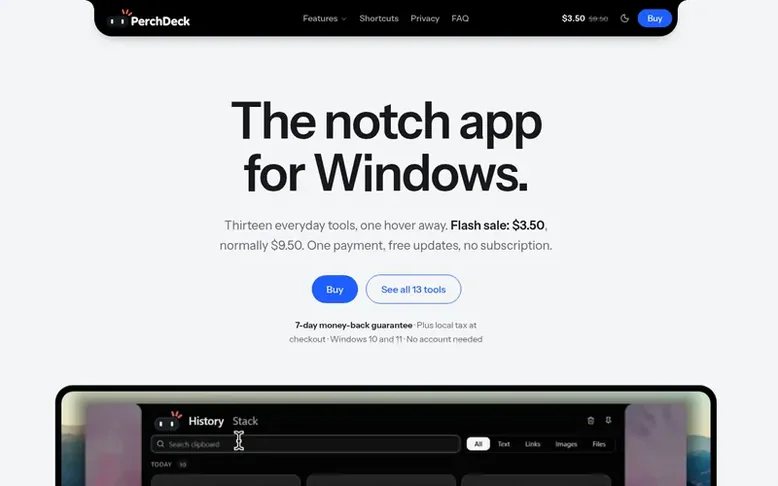
PerchDeck: the homepage
PerchDeck is a Windows desktop application that adds a small notch to the edge of your screen. Hovering or clicking the notch opens a panel containing 13 tools designed for everyday use: clipboard history, paste stack, file shelf, snippets, mic mute, camera mirror, timers, to-dos, calendar, notes, voice memos, calculator, unit converter, teleprompter, and an on-device AI chat.
All data stays on your PC with no account required, no telemetry, and no analytics. The app works mostly offline after a single activation, and includes optional AI that runs locally on your computer. Updates are free with a one-time purchase.
Listed capabilities
- Clipboard history - searchable and pinnable, with password manager exclusion
- Paste stack - copy multiple items and paste them one after another in order
- File shelf - temporary holder for files without modifying originals
- Snippets with placeholders like date, clipboard and fill-in-the-blank
- Mic mute and camera mirror with global shortcuts
- Timer with countdown, stopwatch and Pomodoro modes with ring notification
- Teleprompter that can be hidden from screen sharing
- On-device AI chat with no account or data leaving your PC
- Natural language calculator supporting expressions like percentages and unit conversions
- Unit converter with 35 units across five kinds
Pricing
Pricing model: Paid
$4.5 during flash sale, normally $14.5 USD. One-time payment, free updates.
Follow PerchDeck for an email about each milestone, update and new product they post, in a daily summary.
PerchDeck metrics
| Metric | Value |
|---|---|
| Domain Rating | 9 +1 (up) since last check |
| Trust Flow | 5 no change since last check |
| Citation Flow | 19 no change since last check |
| Referring domains | 6 no change since last check |
| External backlinks | 20 no change since last check |
Ahrefs Domain Rating listed 6 Nov 2026, relisted 1 Nov 2026. Listed under topic: Computers/Software/Operating Systems (5). Majestic listed 26 Oct 2026, relisted 26 Oct 2026. Link data listed by Majestic. Trust Flow, Citation Flow and Topical Trust Flow are trademarks of Majestic-12 Ltd.
PerchDeck domain listing data
Show the listing data
| Domain age | 1 month |
|---|---|
| Registered | |
| Expires | |
| Registrar | CloudFlare, Inc. |
| DNSSEC | Not signed |
PerchDeck launch receipt entry
| Measure | At launch, then latest |
|---|---|
| Domain Rating (Ahrefs) | 6 to 9 +3 (up) since launch 26 Oct 2026, then 5 Nov 2026 |
| Trust Flow (Majestic) | 5 first measured 26 Oct 2026 |
| Referring domains (Majestic) | 6 first measured 26 Oct 2026 |
Day 10 since launch. Next receipt: day 30, 25 Nov 2026. We show what changed, not what caused it: many things affect these numbers. Nothing here is estimated.
Before you launch
The playbook on SaaS Directory List lists what to prepare, what to post on launch day and where else to list your product.
Compare and explore
Quick answers
What is PerchDeck?
PerchDeck is a Windows desktop app that puts a small black notch at the edge of your screen. Hover or click it and it opens into a panel of 13 everyday tools: clipboard history and a paste stack, a file shelf, snippets, mic mute and a camera mirror, timers, to-dos, a calendar, a note, voice memos, a calculator, a unit converter, a teleprompter and Ask PerchDeck, an AI chat that runs on your PC.
How much does PerchDeck cost?
$4.5 during the flash sale, normally $14.5. A one-time payment for a license key, with free updates, priced in US dollars; checkout shows your local currency. Plus local tax, added at checkout.
How do I buy and activate PerchDeck?
Buy a license on this site (a one-time payment). Dodo Payments emails you a license key. Install PerchDeck, hover the notch, paste the key into the Activate PerchDeck box and press Activate. It needs an internet connection once, then PerchDeck restarts unlocked.
Does the clipboard history record my passwords?
No. Copies from KeePass, KeePassXC, Bitwarden, 1Password, LastPass, Dashlane, NordPass, Enpass, RoboForm and Proton Pass are never recorded, nor are copies that apps mark as private with Windows' own opt-out. You can add any other program to a Never record list.
Will I pay tax on top of the price?
Where local tax applies (VAT, GST or sales tax), it is added at checkout based on your country and postal code, and shown as a separate line before you pay. Dodo Payments, which handles the payment, calculates and collects the tax.
Leave a review for PerchDeck
No reviews listed for PerchDeck yet. List the first one.
Listing a review is free. No one pays for reviews. See the listed reviews
List reviews · List updates · Share the list · Your tool? Claim this list entry · Report this list entry
PerchDeck has a free listing. The owner can unlock the full profile with a paid launch for $5:
- Founder story (locked)
- Milestones (locked)
- Demo video (locked)
- Dofollow website link (locked)
Also on the list
-
 Number 1: Omphalis
A workspace for reading articles, PDFs, videos and podcasts with AI explanations and cross-source questions
Productivity & Personal ToolsUnited StatesSince 2026
DR 43 +1 (up) since last check 1 votes. Log in to move Omphalis up the list -
 Number 2: MeetNote
AI Meeting Notes That Turn Conversations Into Action
DR 0 no change since last check 0 votes. Log in to move MeetNote up the list -
Number 3: Playlist Exporter
Export YouTube playlists to CSV, Excel, JSON and 10 more formats
DR 0 no change since last check 0 votes. Log in to move Playlist Exporter up the list -
 Number 4: Scappi
Recipe box for organizing recipes from links, photos and cookbooks
Productivity & Personal ToolsEstoniaSince 2026
DR 0 no change since last check 0 votes. Log in to move Scappi up the list