
Productivity & Personal Tools
CopyPasta
A private-by-default clipboard manager for macOS that opens from the notch
- 0community votes
- 6DR by Ahrefs +2 (up) since last check
Ahrefs Domain Rating listed 6 Nov 2026, relisted 1 Nov 2026.
CopyPasta remembers everything you copy—text, images, screenshots, colors and vectors—keeping it one hover away, searchable and organized.
What it is
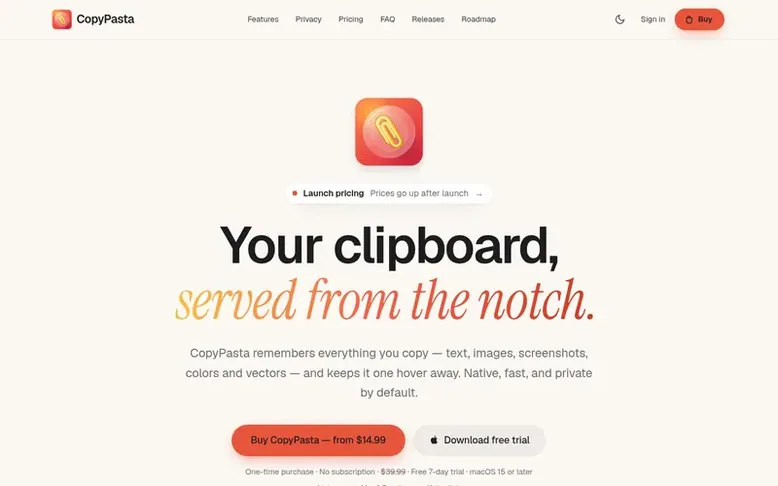
CopyPasta: the homepage
CopyPasta is a clipboard manager for macOS that lives in your notch and remembers everything you copy. It saves text, images, screenshots, colors, vector graphics and files with full formatting preserved. You can search your entire history, open the clipboard popup by hovering the notch or pressing Control-Command-C, and paste items one at a time or multiple items together through the Paste Stack feature.
The app is designed with privacy and security at its core. All clipboard history is encrypted on your Mac with AES-256, and passwords and API keys are automatically detected and hidden behind dots. iCloud sync is available to share your history between your own Macs, still encrypted, with no CopyPasta servers involved. Additional features include on-device OCR to make text in screenshots searchable, screenshot markup and beautification for social media, color palette generation, JSON formatting, and Apple Intelligence summaries and rewrites.
CopyPasta is built for keyboard-first workflows, with full keyboard control for opening, searching, selecting and pasting. It offers a free 7-day trial with all features, then requires a one-time purchase license with no subscription.
Listed capabilities
- Clipboard history that captures text, images, screenshots, colors and vector graphics with full formatting preserved
- Search entire clipboard history with results from text inside screenshots using OCR
- Paste Stack to copy multiple items and paste them one by one in order
- Automatic detection and hiding of passwords, API keys and tokens behind dots
- Screenshot markup with arrows, boxes, notes, text and blur before sharing
- Screenshot beautification with presets for social platforms like Instagram, LinkedIn and YouTube
- Color palette generation from hex and RGB values with matching complementary palettes
- Multi-copy to select and paste multiple items together in one action
- Custom categories to organize and permanently keep important clips
- iCloud sync across multiple Macs with end-to-end encryption
Pricing
Pricing model: Free trial
Personal (1 Mac): $14.99 launch pricing, $29.99 after launch. Plus (3 Macs): $29.99 launch pricing, $39.99 after launch. Studio (5 Macs): $39.99 launch pricing, $49.99 after launch. One-time payment with lifetime updates.
Follow CopyPasta for an email about each milestone, update and new product they post, in a daily summary.
CopyPasta metrics
| Metric | Value |
|---|---|
| Domain Rating | 6 +2 (up) since last check |
| Trust Flow | 3 no change since last check |
| Citation Flow | 14 no change since last check |
| Referring domains | 1 no change since last check |
| External backlinks | 4 no change since last check |
Ahrefs Domain Rating listed 6 Nov 2026, relisted 1 Nov 2026. Listed under topic: Science/Technology (3). Majestic listed 29 Oct 2026, relisted 29 Oct 2026. Link data listed by Majestic. Trust Flow, Citation Flow and Topical Trust Flow are trademarks of Majestic-12 Ltd.
CopyPasta domain listing data
Show the listing data
| Domain age | 21 days |
|---|---|
| Registered | |
| Expires | |
| Registrar | Porkbun LLC |
| DNSSEC | Not signed |
CopyPasta launch receipt entry
| Measure | At launch, then latest |
|---|---|
| Domain Rating (Ahrefs) | 2 to 6 +4 (up) since launch 29 Oct 2026, then 5 Nov 2026 |
| Trust Flow (Majestic) | 3 first measured 29 Oct 2026 |
| Referring domains (Majestic) | 1 first measured 29 Oct 2026 |
Day 7 since launch. Next receipt: day 30, 28 Nov 2026. We show what changed, not what caused it: many things affect these numbers. Nothing here is estimated.
Before you launch
The playbook on SaaS Directory List lists what to prepare, what to post on launch day and where else to list your product.
Compare and explore
Quick answers
What is CopyPasta?
CopyPasta is a clipboard manager for macOS that lives in your notch. It remembers everything you copy, so you can find it, preview it and paste it again whenever you need it. You can hover the notch or press Control-Command-C to open it.
Which version of macOS do I need?
macOS 15 Sequoia or later. CopyPasta works on every Mac that runs it, with or without a notch.
Where is my clipboard history stored?
Your clipboard history is stored on your Mac, encrypted with AES-256, with the key kept in your Keychain. If you turn on iCloud sync, your history is shared between your own Macs through your iCloud account and stays encrypted there too.
Does anything I copy ever leave my Mac?
No. CopyPasta has no servers for your clipboard and no analytics. Text recognition and Apple Intelligence run on your Mac. The only things it sends are your license key when you activate it, and update checks. If you turn on iCloud sync, your history goes to your own iCloud account, never to CopyPasta.
How are passwords handled?
Text that looks like a password is detected and masked automatically. Copies marked as private by 1Password, Bitwarden or Apple Passwords are never saved. For 10 minutes after copying, a click shows the password. After that, showing, copying or pasting it requires Touch ID or your Mac password. Hidden secrets are left out of search.
Leave a review for CopyPasta
No reviews listed for CopyPasta yet. List the first one.
Listing a review is free. No one pays for reviews. See the listed reviews
List reviews · List updates · Share the list · Your tool? Claim this list entry · Report this list entry
CopyPasta has a free listing. The owner can unlock the full profile with a paid launch for $5:
- Founder story (locked)
- Milestones (locked)
- Demo video (locked)
- Dofollow website link (locked)
Also on the list
-
 Number 1: Omphalis
A workspace for reading articles, PDFs, videos and podcasts with AI explanations and cross-source questions
Productivity & Personal ToolsUnited StatesSince 2026
DR 43 +1 (up) since last check 1 votes. Log in to move Omphalis up the list -
 Number 2: MeetNote
AI Meeting Notes That Turn Conversations Into Action
DR 0 no change since last check 0 votes. Log in to move MeetNote up the list -
Number 3: Playlist Exporter
Export YouTube playlists to CSV, Excel, JSON and 10 more formats
DR 0 no change since last check 0 votes. Log in to move Playlist Exporter up the list -
 Number 4: Scappi
Recipe box for organizing recipes from links, photos and cookbooks
Productivity & Personal ToolsEstoniaSince 2026
DR 0 no change since last check 0 votes. Log in to move Scappi up the list